DLP 3D Printing: How It Works, Resolution & Accuracy
16 min
- What Is DLP 3D Printing?
- How a DLP Printer Works
- Pixel Size, Resolution — and Why Accuracy Is Different
- DLP vs SLA vs MSLA (LCD)
- True DLP vs "Fake" DLP: The MSLA Misconception
- When DLP Makes Sense
- DLP vs SLA vs MSLA: Which Should You Choose?
- Safety and Post-Processing Basics
- FAQ about DLP 3D Printing Guide
- From Flash to Finished Part
Key Takeaways
- DLP 3D printing is a resin process that cures an entire layer in one flash of a digital projector, using a chip of microscopic mirrors to project each slice as a single image.
- The technology comes from digital light processing projectors: a Digital Micromirror Device (DMD), developed at Texas Instruments in 1987, steers thousands of tiny mirrors to draw the layer with light.
- Because the whole layer flashes at once, layer time stays constant no matter how many parts sit on the build plate, which is what makes batch production fast.
- A true DLP printer uses projector optics, while MSLA printers cure through an LCD masking screen. The print cycle is similar; the light path is not.
- Pixel size drives XY detail, but resolution is not accuracy: resin shrinkage, exposure, calibration, optical quality, and post-curing all shape final dimensions.
- DLP suits small, detailed parts produced in batches; for applications where smooth curved surfaces or larger build areas are priorities, SLA can be a better fit.
DLP 3D printing answers a simple production question: what if you could cure an entire resin layer with a single flash of light, instead of tracing it point by point? The answer, worked out through projector technology rather than printer engineering, is one of the fastest ways to put fine detail into resin. It is also the reason a jewelry studio can print a full plate of wax patterns in a fraction of the time a laser machine needs. This guide covers how a DLP printer works, how projected pixel size relates to resolution and accuracy, where the light path differs from SLA and LCD machines, and when the technology is the right call.
What Is DLP 3D Printing?
DLP 3D printing (digital light processing) is a vat photopolymerization process: a build platform sits in a vat of liquid resin, and a digital projector cures each layer by flashing its image through the bottom of the vat in one exposure. Where the light hits, the resin solidifies; where it does not, the resin stays liquid. The part grows from the build plate upward, one full layer per flash.
The technology descends from a projector chip, not from 3D printing. The Digital Micromirror Device (DMD), an array of microscopic hinged mirrors developed at Texas Instruments in 1987, was built for digital projectors, and DLP 3D printers borrow it whole: point the projector at a photosensitive resin instead of a screen, and each "slide" it displays becomes a layer of a physical object.
The whole pipeline reads simply: 3D model → sliced layer images → DMD projection → resin exposure → cured layer → repeat. The one step worth pausing on is the projection itself, because everything distinctive about DLP follows from it.
DLP sits in a family of three resin processes that share the same chemistry and differ only in how they draw light:
| Process | Light source | How a layer forms |
|---|---|---|
| SLA | UV laser | A mirror-steered laser traces the cross-section point by point |
| DLP | Digital projector (DMD) | The whole layer flashes at once as a projected image |
| MSLA (LCD) | LED array + LCD screen | An LCD panel masks the light, curing the layer through transparent pixels |
This page goes deep on the DLP column. For a full decision-level comparison of the two established routes (speed numbers, pros and cons, per-application advice), see the SLA vs DLP guide covered a few sections down.
How a DLP Printer Works
Inside every DLP printer sits the same core instrument: the DMD chip. Underneath its glass window are hundreds of thousands of micromirrors, one per projected pixel, each tiltable between "on" and "off" positions thousands of times per second. To print a layer, the printer sends that layer's cross-section to the chip as an image; the mirrors assigned to solid areas flip on, the projector's UV light bounces off them and through the resin vat's transparent base, and the entire slice polymerizes in a single exposure. Exposure times are typically measured in seconds per layer, with the exact value tuned to the resin, layer thickness, and light intensity of the specific machine.
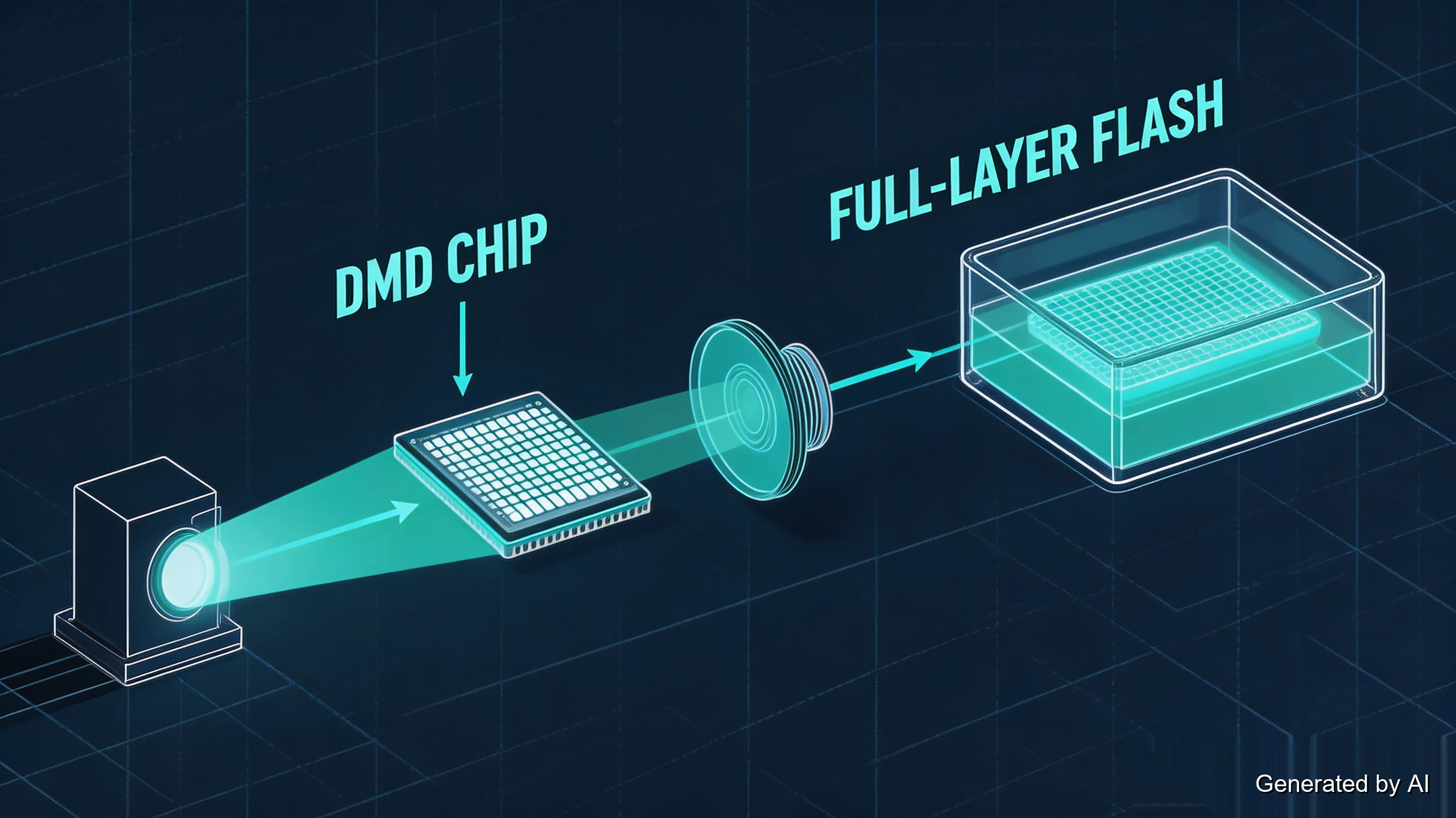
From there the cycle runs like any bottom-up resin printer:
- Exposure. With the layer already sliced and supports generated in your resin slicer, the full layer image flashes; resin cures against the build plate.
- Peel. The plate lifts, pulling the cured layer off the transparent film at the vat's base.
- Return. The plate drops back down, leaving room for fresh resin to flow under the part.
- Repeat. The layer count adds up fast: a 50mm-tall model at 0.05mm layers is 50 ÷ 0.05 = 1,000 cycles.
- Post-process. Wash in isopropyl alcohol, remove supports, and post-cure under UV light until the resin reaches its designed strength.
Two consequences of the projector design are worth understanding, because they explain most of DLP's character:
Layer time is constant. The flash lasts the same few seconds whether the layer carries one small part or forty of them — the projector displays one image either way. This is the physical fact behind DLP's reputation for batch production: filling the build plate makes each part cheaper in time, not slower. A laser cannot do this; tracing forty parts means tracing forty times the path.
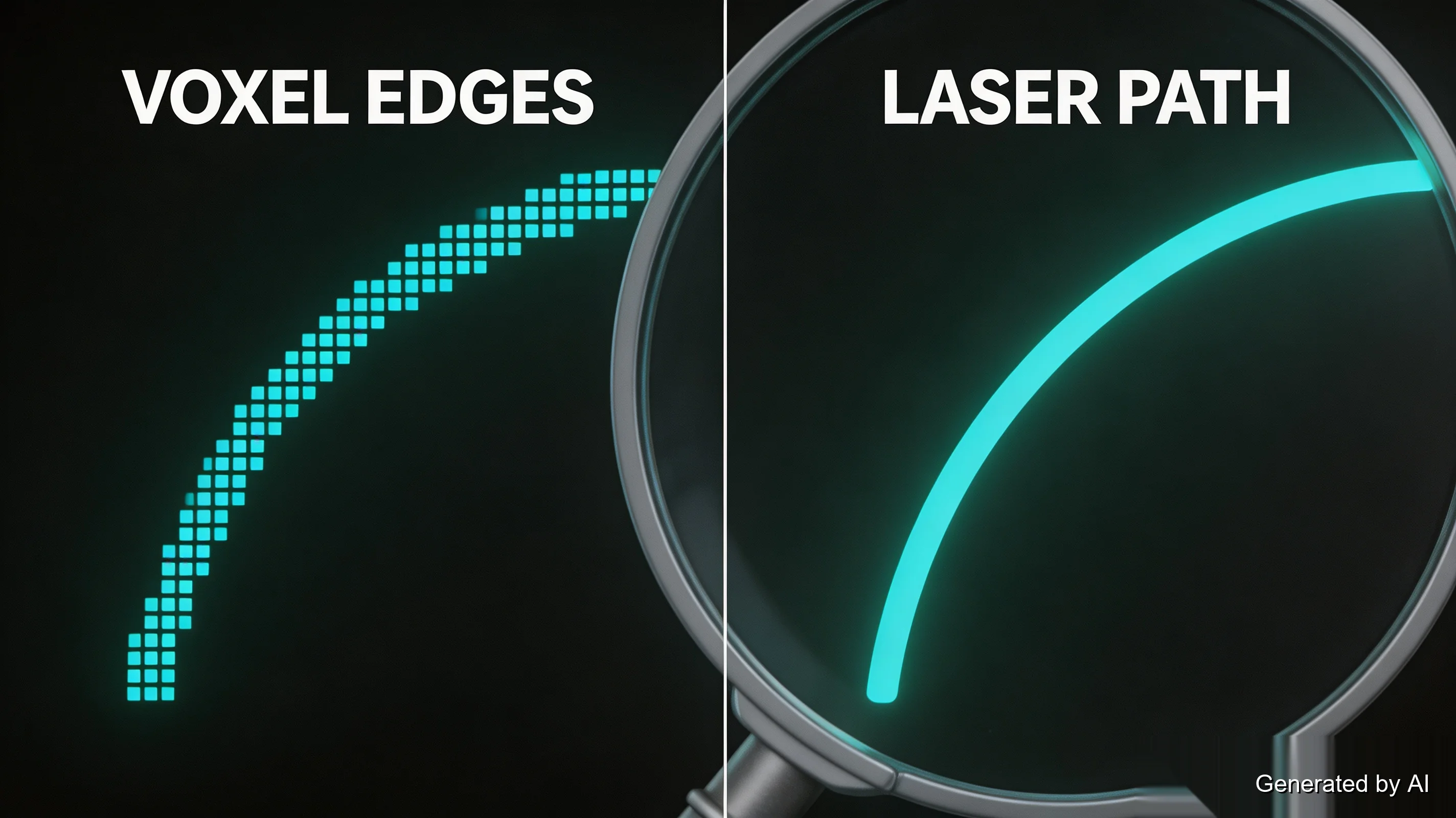
The pixel is the atom. A DLP printer's XY resolution is set by the projected pixel size, not by any beam that can be steered. Every cured layer is a grid of tiny voxels (3D pixels), and a curved edge in the design becomes a staircase of these voxels at the micro scale. On small features it is invisible; on long, shallow curves against raking light, it can read as a faint texture that a continuously traced laser path would not leave.
Pixel Size, Resolution — and Why Accuracy Is Different
Since the projected image is made of pixels, the size of each pixel on the resin surface sets the horizontal detail ceiling. A simplified relationship:
Projected pixel size ≈ projected image width ÷ projector resolution
If a projector lays 1,920 pixels across a 100mm-wide build area, the nominal pixel pitch works out to 100 ÷ 1,920 ≈ 0.052mm — about 52 micrometers per pixel. The real optical path is more complex (manufacturers measure and magnify differently), so treat the number as a starting point rather than a spec.
Two related distinctions keep coming up in DLP discussions:
Pixel size is not layer height. Pixel pitch governs detail in the horizontal (XY) plane; layer height governs thickness in the vertical (Z) direction. A printer can pair a 50µm layer height with a very different XY pixel pitch, and the two numbers describe different directions of the same print.
Resolution is not accuracy. A smaller pixel allows finer projected features, but dimensional accuracy depends on much more: optical distortion, focus across the build area, light-intensity uniformity, resin shrinkage, exposure settings, machine calibration, support strategy, part orientation, and post-curing. Two printers with identical nominal pixel sizes can produce parts with meaningfully different dimensional consistency — and a printer with a larger pixel pitch is not automatically less accurate than one with a smaller number.
That last point extends to the optics themselves. The projected image must stay focused and evenly lit across the whole build area; where focus drifts or light falls off toward the edges, feature definition and dimensional consistency drift with it. This is a real part of why two DLP printers with similar nominal resolution can behave differently in production, and why calibrated industrial optics command their price.
DLP vs SLA vs MSLA (LCD)
All three processes cure the same resins and produce parts in the same post-processing workflow. What separates them is the light path, and each light path carries a trade-off:
| SLA (laser) | DLP (projector) | MSLA (LCD mask) | |
|---|---|---|---|
| Layer formation | Laser traces point by point | Full layer in one flash | Full layer through an LCD mask |
| XY resolution | Laser spot — very fine, continuous | Projector pixel pitch | Screen pixel pitch (2K–8K panels) |
| Curve quality | Smoothest — continuous path | Faint voxel texture on shallow curves | Same voxel behavior as DLP |
| Layer time | Grows with part count and complexity | Constant | Constant |
| Typical hardware cost | Highest (precision optics) | Mid to high (true projector units) | Lowest — desktop units run a few hundred dollars |
| Where it lives | Industrial and prosumer shops | Dental, jewelry, and industrial benches | Most desktop hobby setups |
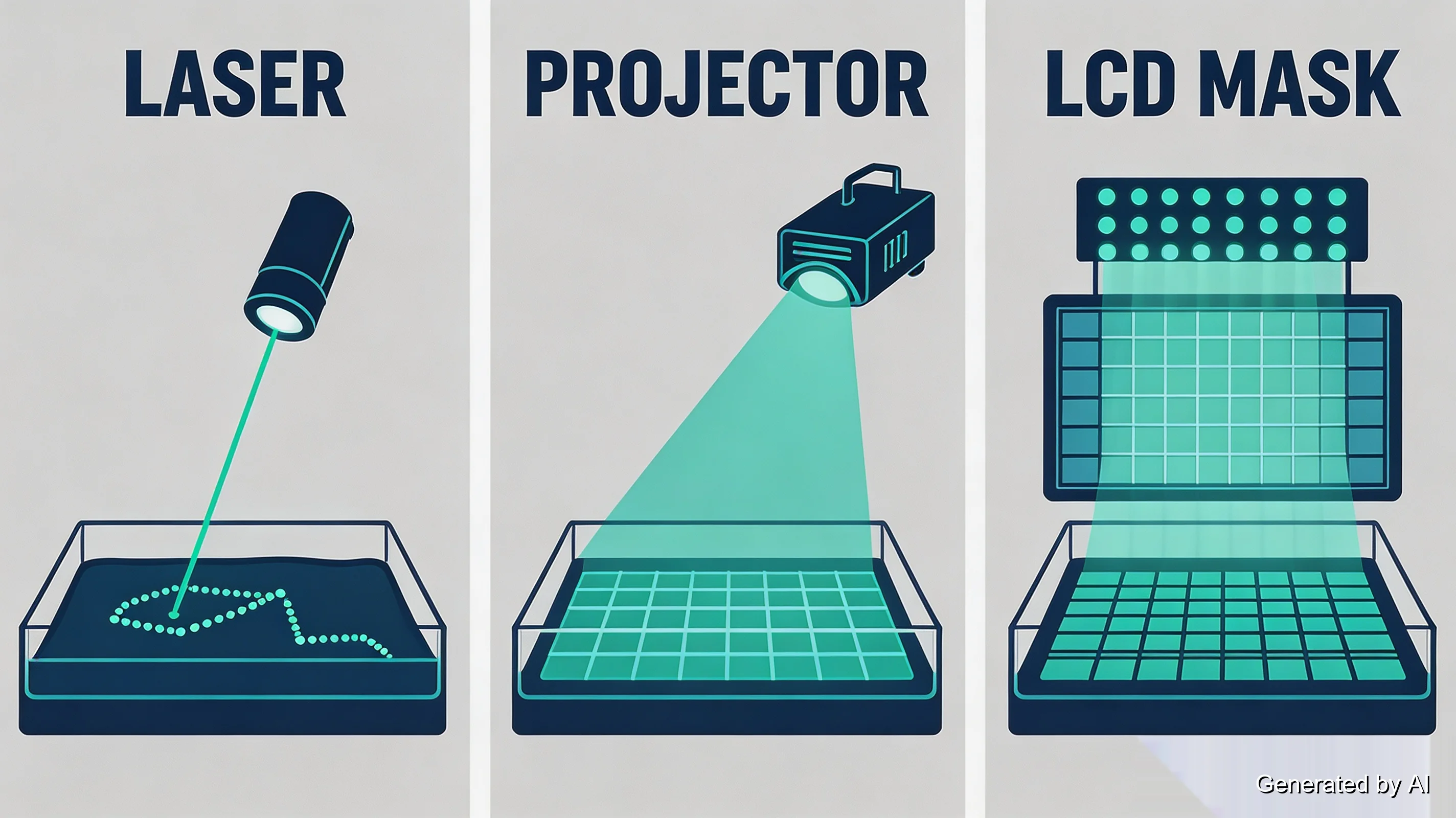
Reading the table by column tells each technology's story. SLA buys its smooth curves with a laser that must physically travel; DLP trades a hint of voxel texture for constant layer time; MSLA delivers DLP-style whole-layer curing through a consumer screen, which is why it owns the desktop market.
One boundary matters before choosing between them: the differences above describe the light path, and the light path is only one input among many. Calibration, resin chemistry, and machine class shift real-world results more than the badge on the light source. When you want the full decision framework — speed figures, strengths and weaknesses side by side, and which process fits which application — the SLA vs DLP comparison handles it in depth.
True DLP vs "Fake" DLP: The MSLA Misconception
The word "DLP" is used loosely across the industry: many printers sold and discussed as "DLP printers" are, strictly speaking, MSLA machines — an LED array shining through an LCD screen that acts as a dynamic photomask, with transparent pixels letting light through to cure the layer.
The confusion is understandable. Both technologies cure the whole layer at once, both produce voxel-grid detail, and the print cycle feels identical from the outside. Makers say "DLP printer" the way people say "Hoover" for vacuum. But the light paths are genuinely different hardware:
- A true DLP printer projects light through actual optics: a DMD chip, a lens stack, a calibrated throw distance (the projector-to-vat spacing). The image stays in focus across the build area and the optics hold calibration over long runs.
- An MSLA printer fires an LED panel through a mass-produced LCD screen. The screen *is* the optics. It works remarkably well, which is why desktop resin printing costs a few hundred dollars instead of a few thousand.
Why the distinction occasionally matters:
- Pixel sharpness. Projected light keeps crisper pixel edges than light passed through an LCD, which scatters slightly. On the finest features, true DLP edges read cleaner.
- Screen aging. An LCD mask is a consumable — panels degrade with UV exposure hours, and light bleed through aged pixels softens detail long before the screen fails visibly. Projector optics age far more slowly.
- Where each lives. True DLP hardware occupies dental labs, hearing-aid shops, and jewelry benches — production environments that pay for optics. MSLA owns the desktop.
The practical takeaway for a buyer: verify the light path before you believe the label. Three checks settle it:
- Read the spec sheet's light-source field. It should say DLP with a DMD-based projector, or LCD/MSLA with a panel size (2K, 4K, 8K). "DLP" at a desktop price with no projector spec is a red flag.
- Look at the machine. A projector-based printer has a lens port aimed at the vat's base; a screen-mask machine has a flat panel under the vat and nothing that looks like a lens.
- Sanity-check the price. Precision optics cost money. A "DLP" listing at typical MSLA prices is almost always MSLA with borrowed branding.
If the checks come back LCD or MSLA, you are looking at screen-mask curing — which is a fine technology, just not projector-based DLP. And for applications where continuous laser scanning and smooth surface transitions are priorities, SLA can be a better fit: the laser traces curves continuously rather than assembling them from any pixel grid at all.
When DLP Makes Sense
The constant-layer-time fact from earlier does the reasoning here. DLP earns its place wherever many small parts share a build plate:
- Batch production of small items. Dental models, jewelry patterns, earbud tips, miniature components: anything printed dozens at a time. Because the flash does not care how full the plate is, the per-part time cost drops as you pack more in.
- Uniform detail across a batch. Every part sits under the same projected image quality; there is no "corner of the plate" penalty and no path-length variation between parts.
- Small-format precision. Projector throw distances favor compact build volumes, which suit small precision parts, and limit DLP for anything large.
The honest counter-cases: single large parts exceed what projector optics can cover at fine pixel pitch, and if you only print occasionally, an MSLA desktop machine delivers most of the same capability for a fraction of the price.
DLP vs SLA vs MSLA: Which Should You Choose?
Start from the part, not the printer. The table below is a starting point rather than a rule — machine design, resin formulation, and calibration can shift any line in it:
| Your priority | Stronger starting point | Why |
|---|---|---|
| Many small parts, fast | DLP or MSLA | Whole-layer exposure keeps per-part time low as the plate fills |
| Smoothest long curves | SLA | Continuous laser path leaves no voxel staircase |
| Largest build area | SLA | Laser coverage scales to bigger volumes |
| Lowest entry cost | MSLA | Screen-mask hardware is the affordable end |
| Tight dimensional tolerances | Evaluate the system, not the tech | Accuracy follows calibration, resin, and optics more than light-source type |
Whichever column you land on, the resin, the exposure profile, and the calibration matter as much as the badge — two machines of the same technology can behave differently with the same file.
Safety and Post-Processing Basics
Resin chemistry is the same across all three processes, and so is the handling discipline. Uncured resin is a skin sensitizer and irritant: nitrile gloves, ventilation, and eye protection are part of the setup, not optional extras. A freshly printed part is still wet with unreacted resin until it is washed (usually in isopropyl alcohol) and then post-cured under UV light. That second step is not cosmetic: the part reaches its designed mechanical properties, and full resin conversion, only after the post-cure. Liquid resin waste and used solvent need to be cured or disposed of as the label directs, not poured away. If a print does come out wrong, the usual suspects are exposure calibration and support strategy: our resin print failure guide walks the common failures and their fixes.
FAQ about DLP 3D Printing Guide
Q: Is DLP the same as SLA?
No — they are siblings, not twins. Both cure liquid resin layer by layer (vat photopolymerization), but SLA draws each cross-section with a steered laser while DLP flashes whole layers from a projector. The practical differences (speed profiles, surface finish, cost) come directly from that one distinction. Our SLA vs DLP comparison works through the decision in detail.
Q: Is DLP better than LCD (MSLA), and how do I tell them apart?
For edge sharpness and long-term calibration, true DLP optics hold an edge: projected light keeps crisper pixel boundaries than light through a screen, and LCD panels degrade with use. For most desktop purposes, MSLA delivers very similar results at a fraction of the hardware cost. To identify a specific machine, check the spec sheet's light-source field (a DMD projector means DLP; a 2K/4K/8K panel means MSLA) — the identification section above walks the full check.
Q: What is the resolution of a DLP 3D printer?
It depends on the projector's resolution and optical magnification, which together set the projected pixel size (pixel pitch ≈ image width ÷ resolution). A 1,920-pixel projector across a 100mm build area gives roughly a 52µm pixel. Nominal pixel size describes detail potential, not guaranteed print quality.
Q: Is DLP 3D printing accurate?
It can be, but accuracy is not the same specification as resolution. Resin shrinkage, exposure settings, calibration, optical distortion and uniformity, part orientation, and post-curing all affect final dimensions. For tolerance-critical parts, evaluate the printer and resin combination against the required tolerances rather than the pixel number.
Q: What is a DLP printer used for?
Production-style work with many small, detailed parts: dental models and surgical guides, jewelry wax patterns, hearing-aid shells, and small precision components. The common thread is batch small-format printing where constant layer time turns into real throughput.
Q: Do DLP printers need supports?
Yes. Like all vat photopolymerization processes, DLP cures the part against the build plate and needs support structures to hold overhangs and bridge the peel forces. Orientation matters as much as supports: angled parts spread the peel stress across layers and protect fine surfaces.
Q: How fast is DLP 3D printing?
Per layer, typically a few seconds — and that number stays fixed whether the layer holds one part or forty. Total print time still includes platform movement, recoating, separation, and post-processing, so the speed advantage is most visible in batches of small parts rather than any single overnight print.
Q: Can I get DLP-style resin parts without buying a printer?
Yes. A 3D printing service is often the more practical route for production parts. JLC3DP prints detailed resin parts via SLA — continuously traced laser paths for smooth surfaces — with automatic manufacturability checks and an engineer reviewing every model. For parts where smooth curves and surface quality are priorities, SLA is frequently the stronger process choice.
From Flash to Finished Part
DLP's whole character comes from one swap: replacing a steered beam with a projected image. That swap makes every layer a single flash, makes the build plate's fullness irrelevant to speed, and makes a projector chip originally built for slide shows the heart of a production machine. Read the pixel pitch as a detail ceiling rather than a promise of accuracy, check the light path behind any "DLP" label, and match the process to the part. And when the part calls for smooth resin surfaces from a continuously traced laser path, that work is one upload away.
Keep Learning
How Do Resin 3D Printers Work? A Beginner's Guide
Key Takeaways A resin 3D printer works by curing each layer of liquid photopolymer with light — either tracing the layer with a laser or exposing it through a projected or masked image. A build plate dips into a shallow vat of resin, and the layer hardens only where light reaches it. The print cycle runs on a rhythm fused deposition modeling (FDM) machines do not have: expose the layer, peel it off the film at the bottom of the vat, let fresh resin flow back, and repeat. A 50mm part at 0.05mm layers t......
DLP 3D Printing: How It Works, Resolution & Accuracy
Key Takeaways DLP 3D printing is a resin process that cures an entire layer in one flash of a digital projector, using a chip of microscopic mirrors to project each slice as a single image. The technology comes from digital light processing projectors: a Digital Micromirror Device (DMD), developed at Texas Instruments in 1987, steers thousands of tiny mirrors to draw the layer with light. Because the whole layer flashes at once, layer time stays constant no matter how many parts sit on the build plate......
SLA vs DLP 3D Printing: The Ultimate Guide to Speed, Accuracy, and Choosing the Right Technology
SLA vs DLP 3D Printing: What’s the Difference? When discussing modern resin 3D printing, SLA (stereolithography) and DLP (digital light processing) are two technologies that are hard to ignore in both the history and evolution of resin printing. As two of the most widely used resin printing methods today, both processes use liquid photopolymer resin and UV light to build highly detailed parts layer by layer. However, they differ significantly in how each layer is cured, which directly affects print sp......
What's the Difference Between Desktop and Industrial SLA 3D Printers?
In the world of 3D printing,Stereolithography (SLA) has gained prominence for its precision and versatility. SLA technology, which uses a UV laser to solidify liquid resin layer by layer, has given rise to both desktop and industrial SLA 3D printers. Understanding the distinctions between these two categories is crucial for making informed decisions about which one suits your needs. Let's delve into the nuances of desktop and industrial SLA 3D printers. Comparison: Desktop vs. Industrial SLA 3D Printe......