SLA vs DLP 3D Printing: The Ultimate Guide to Speed, Accuracy, and Choosing the Right Technology
16 min
- SLA vs DLP 3D Printing: What’s the Difference?
- What is SLA vs DLP 3D Printing?
- How SLA and DLP Work
- DLP vs LCD (MSLA): A Common Market Misconception
- Industrial vs Desktop SLA and DLP: Why It Matters
- Why the SLA vs DLP Debate Is Changing in 2026
- SLA vs DLP: Speed, Resolution & Accuracy
- SLA vs DLP: Pros and Cons
- Choosing SLA vs DLP
- Summary and Decision Support
- FAQ about SLA & DLP
- Conclusion
- Decision Checklist:
SLA vs DLP 3D Printing: What’s the Difference?
When discussing modern resin 3D printing, SLA (stereolithography) and DLP (digital light processing) are two technologies that are hard to ignore in both the history and evolution of resin printing. As two of the most widely used resin printing methods today, both processes use liquid photopolymer resin and UV light to build highly detailed parts layer by layer. However, they differ significantly in how each layer is cured, which directly affects print speed, surface finish, scalability, and overall production workflow.
An SLA and DLP comparison reveals that SLA uses a focused UV laser to cure each layer point-by-point, while a standard DLP printing setup uses a digital light projector to flash whole-layer patterns at once. In other words, an SLA stereolithography machine ‘draws’ each cross-section with a laser, and a digital light processing printer ‘projects’ the entire layer simultaneously.
This core difference in SLA and DLP technologies means SLA often yields smoother surfaces and slightly higher accuracy, whereas you can successfully 3D print DLP styles to achieve faster print speeds by curing a full layer in one go. Each method has trade-offs in speed, part size, cost, and material handling.
What is SLA vs DLP 3D Printing?
To answer what does SLA stand for 3D printing , SLA is Stereolithography, which is one of the earliest resin 3D printing processes. It employs a UV laser to trace the profile of each layer on a photosensitive resin 3-D printer vat. The resin solidifies wherever the laser hits. After one layer is completed, the build platform rises and the next layer is traced.
On the other hand, understanding how does digital light processing work clarifies the mechanism of DLP. A DLP SLA printer built on DLP technology uses a very different approach: a digital light processing projector (with a Digital Micromirror Device chip) casts an image of the entire layer onto the resin, curing that slice in a single flash. Thus, an SLA system builds parts by scanning a laser point-by-point, whereas a 3D printer DLP SLA device cures each layer at once as a whole image.
Although both belong to vat photopolymerization technologies, SLA and DLP are two distinct branches of resin 3D printing. SLA uses a point-based UV laser scanning method, while DLP relies on a projected area light source to cure an entire layer simultaneously.
If you are still deciding between liquid photopolymers and traditional plastic filaments, check out our comprehensive showdown on Resin vs Filament 3D Printing to choose the right framework for your desktop setup.
How SLA and DLP Work
The key difference in these photopolymer printing methods lies in the curing method. An SLA’s UV laser is directed by galvanometer mirrors to trace each cross-section on the resin surface. The laser cures resin in a continuous path, enabling extremely fine XY resolution (often <100 μm).
In contrast, a 3D printer DLP alternative utilizing DLP relies on a digital projector: a DMD chip turns on or off microscopic mirrors to form the layer’s image. When the image is flashed, the entire layer cures simultaneously. SLA’s point-by-point curing allows smoothly interpolated curves, while a DLP 3D print process features pixel-based curing that inherently creates “voxels” (3D pixels).
Evaluating the drop volume in DLP printer architectures can also impact how fine these voxels appear. After each layer, both platforms peel the cured layer and lower for the next. The fundamental difference in this digital light processing vs stereolithography showdown is that SLA solidifies resin point-by-point via the laser, whereas DLP solidifies each 2D layer in one step.
SLA’s process can be slower (since the laser must dwell on each feature), but it yields very smooth surfaces. Meanwhile, DLP printer evaluations show that DLP’s full-layer curing makes it faster for many parts. Both methods then require support removal and post-curing of the part after printing.
Key Difference in Curing Method: SLA’s laser scanner traces shapes, while DLP’s projector exposes full layer masks. This means SLA prints can feature ultra-smooth contours, and DLP prints can complete layers at once, boosting throughput.
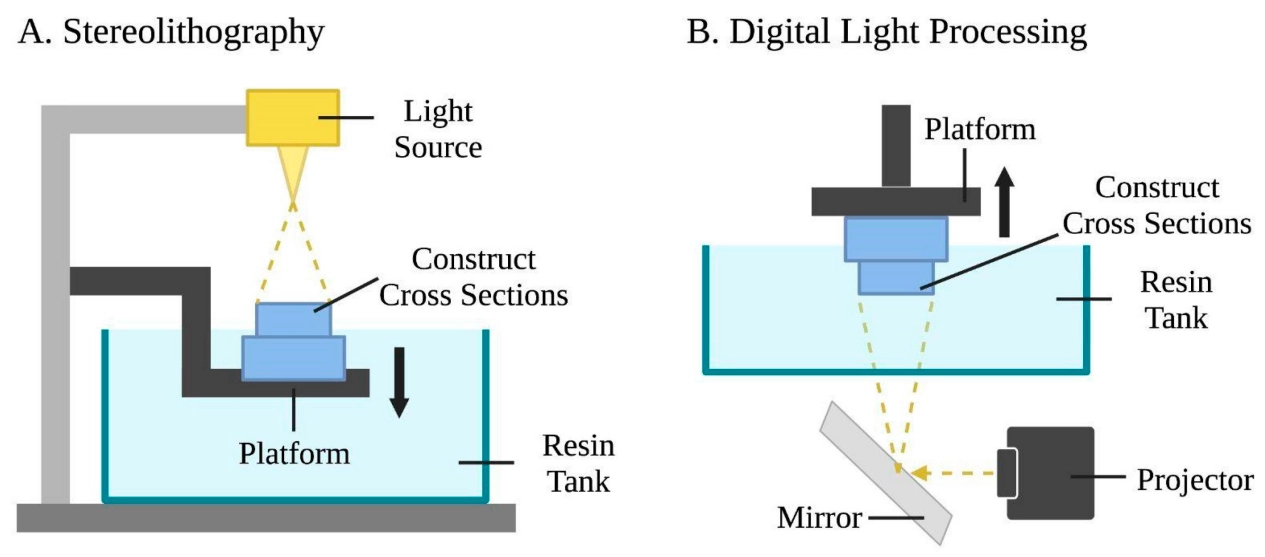
(Source: Encyclopedia)
DLP vs LCD (MSLA): A Common Market Misconception
One common source of confusion in resin 3D printing is that many desktop systems marketed as “DLP” are not true DLP machines.
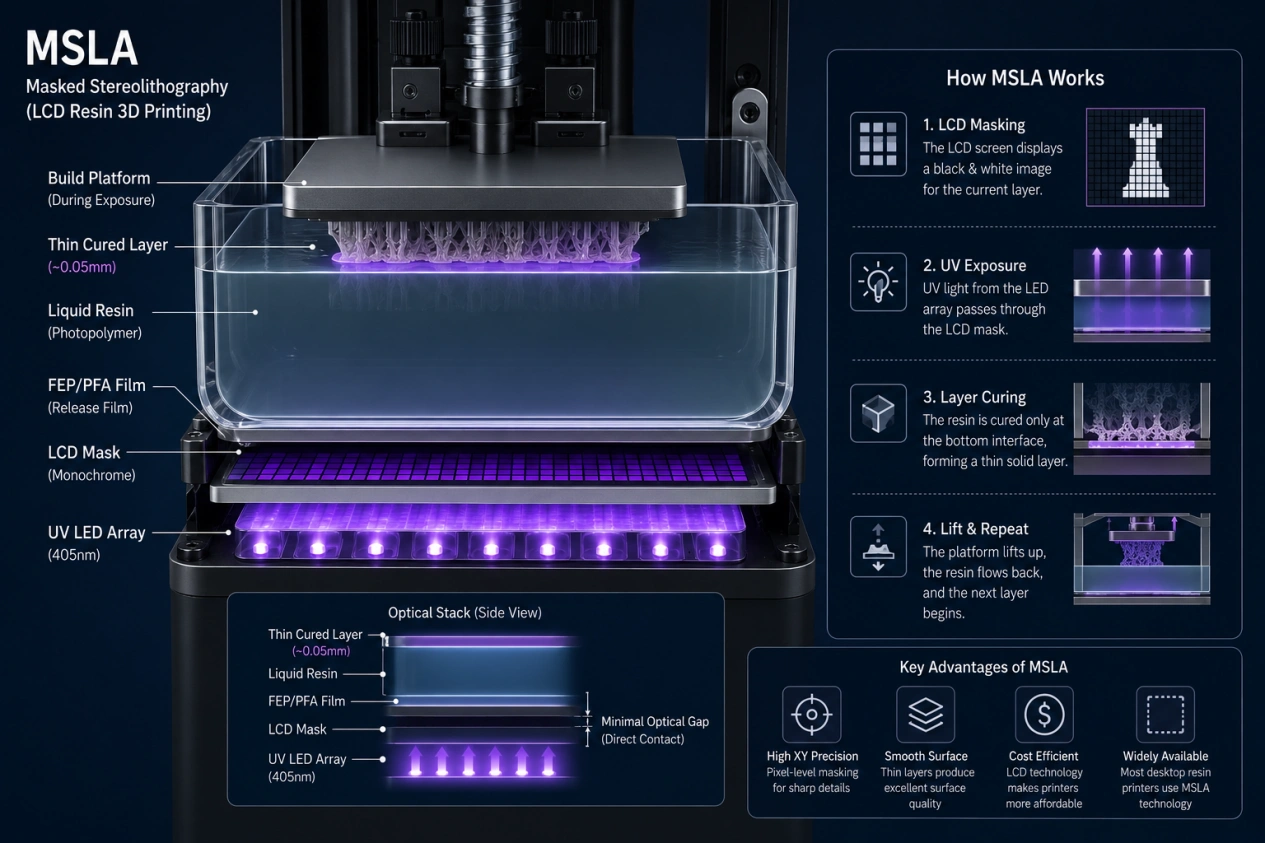
A true DLP printer utilizes an optical projector with a precise DMD (Digital Micromirror Device) chip to cure resin. Because of their higher hardware costs, true DLP systems are predominantly found in industrial and professional environments. In contrast, most consumer-grade desktop printers actually rely on MSLA (Masked Stereolithography), or LCD technology, which uses a standard LCD screen as a digital mask over a UV backlight.
While MSLA has made resin printing highly affordable for desktop hobbyists, it is fundamentally distinct from true projector-based DLP optics. Recognizing this distinction is essential, as many users still casually refer to LCD-masked machines as "DLP printers."
Industrial vs Desktop SLA and DLP: Why It Matters
When comparing SLA vs DLP 3D printing, it’s important to distinguish between industrial-grade and desktop systems.
In many real-world applications, the difference between machine classes has a greater impact than the difference between the technologies themselves.
Industrial SLA and DLP printers typically provide better process stability, larger build volumes, tighter calibration control, and access to engineering-grade resin materials. These systems are designed for consistent production environments where dimensional accuracy, repeatability, and long-term reliability are critical.
Desktop SLA and DLP systems — often including MSLA/LCD resin printers — are more affordable and widely accessible. However, they are generally more limited in build size, thermal stability, material compatibility, and print consistency over long production runs.
For example, an industrial DLP printer may outperform a desktop SLA printer in accuracy, throughput, and manufacturing repeatability despite using a projector-based curing method. Similarly, a professional SLA platform can deliver smoother surfaces and more reliable engineering performance than entry-level DLP or LCD systems.
This distinction is especially important when evaluating functional prototypes, production parts, or precision engineering applications. While many comparisons focus only on laser versus projector curing, actual print quality also depends heavily on optics, motion systems, thermal management, calibration precision, and resin formulation.
In practice, machine class often matters more than SLA vs DLP itself.
Why the SLA vs DLP Debate Is Changing in 2026
In earlier generations of resin printing, the difference between SLA and DLP was often the biggest factor affecting print quality.
That is no longer entirely true.
Modern industrial resin systems have improved significantly in optics, thermal stability, motion control, and resin chemistry. In many professional workflows, machine calibration, exposure consistency, and material engineering now influence final part quality more than whether the system uses a laser or a projector.
For example:
- an industrial DLP platform may outperform a low-cost desktop SLA printer in dimensional stability and repeatability
- advanced SLA systems now use dynamic beam compensation and closed-loop calibration to reduce distortion
- engineering-grade resins have become more important than the curing method itself
As a result, the SLA vs DLP discussion in 2026 is shifting from:“Which technology is better?” to “Which workflow is better optimized for the application?” For production environments, overall process control now matters more than the light source alone.
SLA vs DLP: Speed, Resolution & Accuracy
Speed Comparison
Evaluating SLA vs DLP speed shows that DLP is generally faster per layer. Because DLP printing cures a whole layer at once, its layer exposure time is nearly constant regardless of how many features are in that layer. For example, a digital light processing printer can achieve ~50–60 mm/hour (100 μm layers).
Conversely, SLA speed varies with part cross-section: tracing a large or complex layer takes longer. In practice, a modern 3D printer DLP vs LCD or masked LCD machine can print multiple small parts much quicker than a laser SLA of similar build size. However, total job time also depends on the number of support structures and post-processing, where SLA’s advantage may narrow if supports are extensive.
Ultimately, when analyzing a 3D printer DLP system, adding more parts to a DLP build plate doesn't increase exposure time. For a deeper look at how this batch throughput compares to nozzle-based printing, see our guide on Resin vs FDM for Miniatures, which highlights the efficiency of layer-by-layer curing.
Resolution & Accuracy
Both SLA DLP systems can reach high XY resolution (down to ~50–100 μm). The core SLA resolution advantage is that the laser spot can be extremely fine, giving very smooth and accurate curved surfaces. Lab tests confirm SLA parts had smoother, more consistent geometry than DLP.
The main DLP resolution constraint is that it is limited by the projector pixel pitch. This means a 3D print DLP build consists of cubic voxels (3D pixels) so a curved edge is formed by many tiny cubes. This makes flat or angled surfaces appear slightly faceted at micro-scale. In practice, DLP vs SLA tests indicate that SLA often yields marginally better detail, but a digital light processing projector system can still achieve sub-100 μm features. Overall accuracy also depends on calibration; JLC3DP notes SLA parts typically meet ±0.2 mm dimensional tolerance.
Surface Quality
SLA produces very smooth surfaces, especially on curved sections. While a DLP unit using DLP technology can have excellent detail, it may show slight layer artifacts on planar faces due to the voxel structure. In a strength test, SLA prints had an average surface roughness ~15 nm versus ~25 nm for DLP, illustrating SLA’s smoother finish. In applications where surface finish is critical, checking DLP vs SLA performance metrics show that SLA often has the edge.
Achieving sub-100 μm features on a resin 3-d printer requires a symbiosis between the light source and chemical viscosity. To optimize your prints, read our material analysis on which resin is best for 3D printing fine details vs functional parts to prevent light bleed and preserve micro-scale details.
SLA vs DLP: Pros and Cons
Advantages of SLA
- Smooth, high-fidelity parts: Essential among the advantages of SLA 3D printing , SLA yields extremely smooth surfaces and fine detail.
- Larger parts: Laser scanning in a traditional stereolithography machine can scale to bigger build volumes while maintaining accuracy.
- Material variety: SLA offers many resin options (rigid, flexible, high-temp, etc.).
- Accuracy & strength: SLA parts can meet tight tolerances (±0.2 mm) and often exhibit higher mechanical strength.
Advantages of DLP
- Faster batch printing: Full-layer curing means a digital light processing printer can print many parts at once, improving throughput.
- Lower cost (often): Comparing a desktop 3D printer DLP vs LCD setup shows that these systems can be less expensive than comparable laser-SLA, and projector bulbs are generally cheaper to replace than lasers.
- Uniform detail: Each pixel’s size is consistent across the build area, ensuring uniform detail where lit.
- Ideal for small features: Perfect for high-volume micro-details, since DLP printing treats all parts equally across the build plate.
Disadvantages of SLA
- High cost: Laser-based systems and specialized resins for an SLA stereolithography machine are expensive. Smaller printers have lower throughput, raising per-part cost. Mitigation: Use generic resins or outsource via services when volumes are low to offset cost.
- Limited build size: Many desktop SLA printers have smaller build volumes. Users note a smaller build volume for the same price compared to FDM. Mitigation: Print large models in sections or use industrial SLA (LFS) for big parts.
- Maintenance and consumables: SLA requires optical system calibration, resin management, and regular equipment maintenance. Consumables wear out and add cost. Mitigation: Schedule regular maintenance; keep spare consumables stocked; optimize resin usage to extend life.
- Brittle parts & warpage: Standard SLA resins are more brittle and prone to creep or warp. Hobbyists report that most resins are too brittle and warp during printing. Mitigation: Use engineered resins (tough, flexible); reinforce design; fully post-cure parts.
- Health & cleanup: Resin fumes are toxic, requiring strict PPE. Post-print washing (IPA baths) and UV curing add time. Mitigation: Wear gloves/masks; run printers in fume-extracted cabinets; use automated wash/cure stations.
Disadvantages of DLP
- Limited build volume: A DLP 3D printer utilizing true DLP typically has smaller XYZ envelopes. Large builds cause pixel resolution drop-off. Mitigation: Divide large models into smaller prints; consider multiple runs.
- Pixelation artifacts: Curved surfaces on a DLP 3D print may appear faceted since parts are composed of tiny “voxels”. Mitigation: Apply smoothing post-process (sanding, vapor polish) or slightly increase surface thickness to hide voxels.
- Resin waste & cost: High-quality DLP resins are pricey and bulk resins must be carefully stored. Mitigation: Dispense only needed resin; filter and reuse uncured resin when possible; tightly cap bottles.
- Equipment availability: True DLP printers with explicit DMD chips are less common; many machines use masked LCD, and the drop volume in DLP printer optics must be factored in. True DLP machines often use lamp-based projectors with bulbs that wear out. Mitigation: Use LED-based DLP for longer life; have replacement lamps/DMD available.
- Platform constraints: A user noted DLP’s main drawback is the size of the buildplate, as XY dimensions are constrained by projector optics. Mitigation: Optimize part layout to maximize bed usage; choose DLP systems with larger compatible optics if needed.
Choosing SLA vs DLP
When to Choose SLA
- Large Parts & Smooth Finish: If you need large, smooth components with high-quality surfaces, laser-based SLA and DLP technologies point to SLA as preferred, since SLA lasers can cover big areas with uniform accuracy.
- Very High Detail: For extremely intricate parts, analyzing digital light processing vs stereolithography highlights SLA's laser as yielding the finest details.
- Special Materials: When you need exotic resin properties, SLA offers a wider material library.
- High Tolerance: SLA can meet tight dimensional accuracy (±0.2mm on small features). It’s often chosen for precision tooling masters or engineering prototypes.
- Strength & Function: For functional parts requiring durability, SLA resins can provide stronger mechanical properties.
When to Choose DLP
- Batch Small Parts: If printing many small or medium parts quickly (e.g. dental models, jewelry patterns, or microfluidic parts), setting up a 3D print DLP process is ideal, producing dozens of tiny parts at once much faster than SLA.
- Fast Turnaround: When lead time is critical, a digital light processing printer reduces total print time.
- Cost Sensitivity: DLP printers (especially desktop resin printers marketed as “DLP” or MSLA) can be more affordable for prototyping small parts.
- Consistent Detail Across Batch: For many identical parts, a DLP printer ensures uniform results layer-to-layer.
- Consumer Resin Printers: Note most consumer “DLP” printers are actually masked LCD (MSLA) units. Either way, projector-based curing is chosen when high throughput of detailed parts is needed.
SLA vs DLP for Miniatures
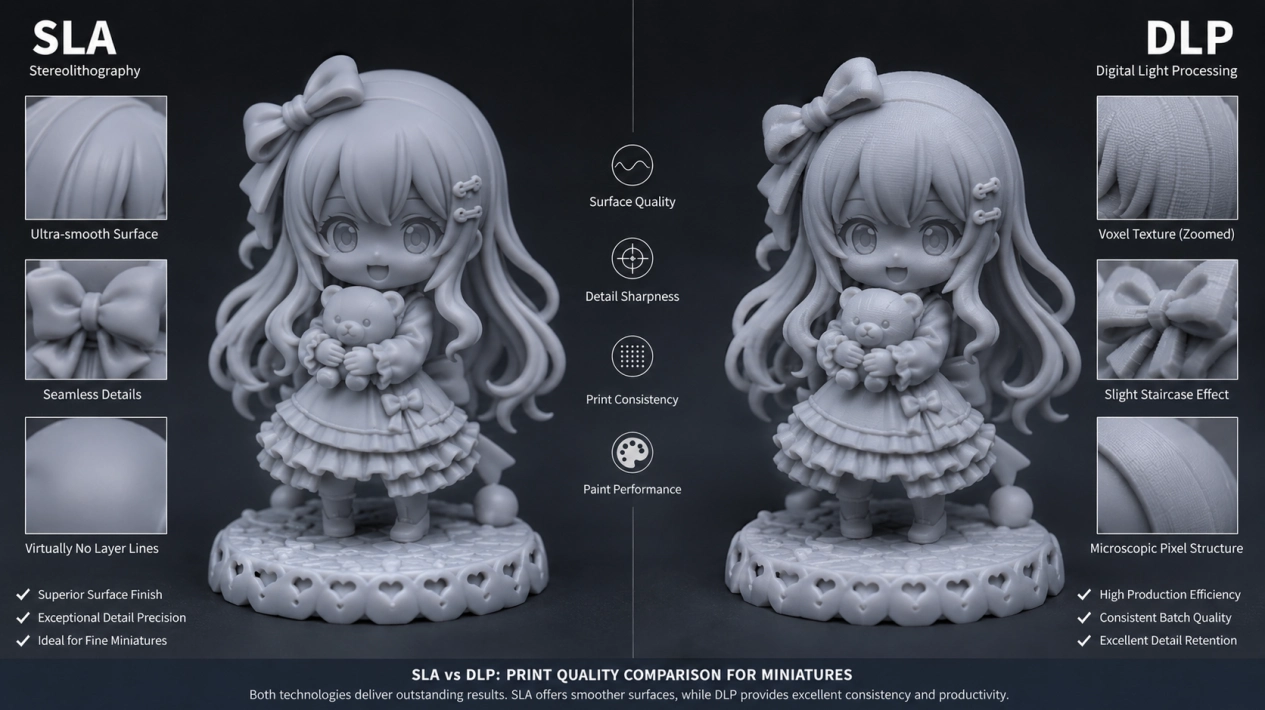
For tabletop miniatures and models, many users find a well-tuned DLP or LCD printer can match or exceed an entry-level SLA in practice. For example, one hobbyist reported that an affordable LCD-based printer produced better-quality minis and much faster prints than a more expensive laser-SLA. In real-world print-and-paint tests, others note that the visible difference in SLA vs DLP output is minimal after priming.
The advantage goes to DLP if you print many minis at once (it can batch eight or more in one go), but a laser-based stereolithography machine still provides top-end detail. In summary: if you need to crank out lots of small models quickly, a resin 3-d printer relying on DLP/LCD is very cost-effective; if you want the absolute finest detail on a single figure, SLA may help.
If you are struggling to capture every crisp muscle line or armor plate on your tabletop figures, check out our Best Resin for Miniatures Buying Guide to pair your hardware with the right curing formulation.
Summary and Decision Support
Choosing between SLA and DLP depends on your application needs: SLA is preferred for ultra-smooth surface quality or larger parts, while DLP is better for fast batch production of small components. Use the comparison table and checklist below to support your decision-making process.
The following table:
| Factor | SLA | DLP |
|---|---|---|
| Light Source | UV laser | Digital light projector (DMD) |
| Curing Method | Point-by-point scan | Entire-layer projection |
| Speed | Slower (laser scan each layer) | Faster (whole layer at once) |
| Build Volume | Typically larger (laser scanners scale) | Limited by projector size |
| Surface Finish | Very smooth & precise | Smooth, minor pixelation |
| Primary Uses | Large, high-detail parts; engineering prototypes | High-throughput of small parts; dental/jewelry models |
FAQ about SLA & DLP
SLA = Stereolithography, a resin 3D printing method using a UV laser. DLP = Digital Light Processing, a resin printing technique using a DMD projector. Generally yes. DLP cures whole layers in one flash, often achieving higher layer throughput. SLA’s speed depends on part geometry (laser path length). SLA typically yields smoother results. DLP parts are detailed but may show micro-faceting on curved surfaces. SLA printers and resins tend to cost more; DLP machines and resins can also be pricey. Both technologies typically have smaller build volumes than large FDM systems, though high-end SLA/LCD machines offer sizeable beds. SLA vs DLP Quick Comparison Table: SLA and DLP each have distinct advantages. SLA is ideal for large, high-precision parts with superior surface quality, while DLP excels at rapid batch production of small components. In real applications, the right choice depends on part size, detail requirements, and production volume. JLC3DP provides professional 3D printing services for the SLA technology, allowing you to upload CAD models and receive instant online quotes for the most suitable manufacturing solution.Q: What does SLA stand for?
Q: What does DLP stand for?
Q: Is DLP faster than SLA?
Q: Which gives smoother finish?
Q: What about cost and volume?
Conclusion
Factor SLA DLP Light Source UV Laser Projector (DMD) Curing Point-by-point Full-layer projection Speed Slower (per layer) Faster (per layer) Best Use Large smooth parts Batch small parts Decision Checklist:
Keep Learning
How Do Resin 3D Printers Work? A Beginner's Guide
Key Takeaways A resin 3D printer works by curing each layer of liquid photopolymer with light — either tracing the layer with a laser or exposing it through a projected or masked image. A build plate dips into a shallow vat of resin, and the layer hardens only where light reaches it. The print cycle runs on a rhythm fused deposition modeling (FDM) machines do not have: expose the layer, peel it off the film at the bottom of the vat, let fresh resin flow back, and repeat. A 50mm part at 0.05mm layers t......
DLP 3D Printing: How It Works, Resolution & Accuracy
Key Takeaways DLP 3D printing is a resin process that cures an entire layer in one flash of a digital projector, using a chip of microscopic mirrors to project each slice as a single image. The technology comes from digital light processing projectors: a Digital Micromirror Device (DMD), developed at Texas Instruments in 1987, steers thousands of tiny mirrors to draw the layer with light. Because the whole layer flashes at once, layer time stays constant no matter how many parts sit on the build plate......
SLA vs DLP 3D Printing: The Ultimate Guide to Speed, Accuracy, and Choosing the Right Technology
SLA vs DLP 3D Printing: What’s the Difference? When discussing modern resin 3D printing, SLA (stereolithography) and DLP (digital light processing) are two technologies that are hard to ignore in both the history and evolution of resin printing. As two of the most widely used resin printing methods today, both processes use liquid photopolymer resin and UV light to build highly detailed parts layer by layer. However, they differ significantly in how each layer is cured, which directly affects print sp......
What's the Difference Between Desktop and Industrial SLA 3D Printers?
In the world of 3D printing,Stereolithography (SLA) has gained prominence for its precision and versatility. SLA technology, which uses a UV laser to solidify liquid resin layer by layer, has given rise to both desktop and industrial SLA 3D printers. Understanding the distinctions between these two categories is crucial for making informed decisions about which one suits your needs. Let's delve into the nuances of desktop and industrial SLA 3D printers. Comparison: Desktop vs. Industrial SLA 3D Printe......