FDM 3D Printer Spaghetti: Causes, Fixes, and Tips
9 min
- What is a "Spaghetti 3D Print" and Why Does It Happen?
- Root Causes: Why Good Print Beds Cause Bad Failures
- The Material Battlefield: Which Filaments Are Most Prone to "Spaghetti"?
- Hardware and Software Safeguards: AI Spaghetti Detectors
- Industrial Insights: How Service Bureaus Like JLC3DP Prevent Failures
- The Quick Checklist: How to Stop Spaghetti FDM 3D Printing Today
- FAQ on Preventing 3D Printer Spaghetti
Every 3D printing enthusiast, from desktop hobbyists to enterprise hardware engineers, shares a common rite of passage: waking up expecting a flawless 14-hour prototype, and instead discovering a bowl of plastic modern art on the build plate.
Welcome to the kitchen. You have just cooked a fresh batch of 3D printer spaghetti.
While a spaghetti FDM 3D print failure is a running joke in the additive manufacturing community, resolving a recurring 3D print failure requires moving past the memes to evaluate structural mechanics and polymer behavior.
This guide diagnoses why a FDM 3D printer making spaghetti errors happens, outlines how to fix spaghetti 3D printing issues across different materials, and shares industrial insights from the shop floors of volume manufacturing bureaus like JLC3DP to help prevent FDM 3D print failed spaghetti incidents.
What is a "Spaghetti 3D Print" and Why Does It Happen?
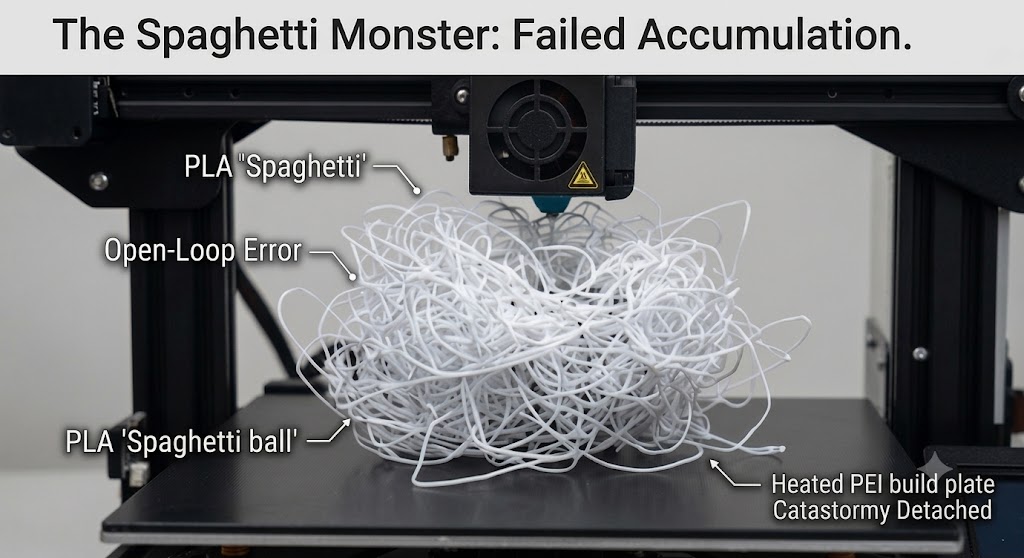
To learn how to stop spaghetti 3D printing disasters, we must first examine the mechanics of the breakdown.
A 3D print failed spaghetti incident occurs when a fused deposition modeling (FDM/FFF) printer continues extruding molten filament into mid-air after the model has detached from the build plate or suffered a major structural collapse.
Because an FDM printer operates on open-loop coordinate instructions, it executes G-code toolpaths without detecting whether the plastic is accumulating correctly. The print head continues drawing toolpaths in thin air. The extruded plastic, lacking a layer underneath to bond with, cools into thin, chaotic strands, turning the build area into a mess of plastic noodles.
Root Causes: Why Good Print Beds Cause Bad Failures
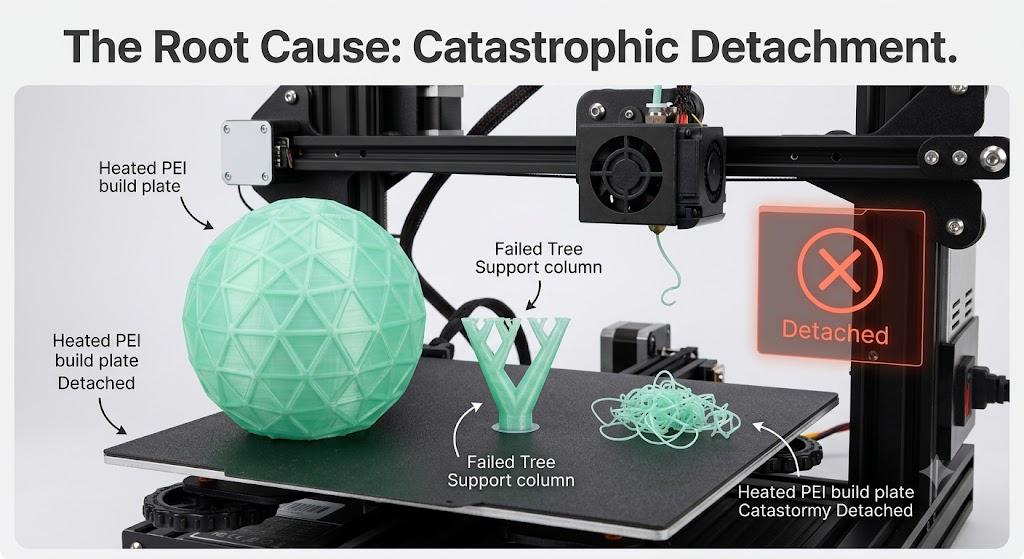
When investigating how to stop 3D printer spaghetti outbreaks, the culprit behind a spaghetti 3D print usually traces back to three fundamental variables:
1. The First Layer Curse (Z-Offset Variance)
If your first layer is not properly compressed onto the build plate, the print may lack the necessary adhesion strength to withstand the lateral forces exerted by a moving print head. A Z-offset that is off by even 0.05mm reduces surface contact area, increasing the risk of a mid-print collapse.
2. Fingerprint Sabotage (Bed Contamination)
Skin oils can hinder polymer adhesion. Oils left on a PEI or glass build plate disrupt the bond between the molten filament and the bed surface, leading to localized lifting (warping) and eventual part detachment.
3. Slicer Sins (Insufficient Structural Support)
Designing a model with aggressive overhangs or top-heavy geometries supported by a single, needle-thin tree support column is a recipe for a total 3D print failure. The moment the nozzle shears against a shifting, unstable support structure, the part detaches, and the printer starts churning out plastic noodles.
4.Excessive Speed & Kinetic Impact (Kinetic Shear Forces)
Pushing print speeds or acceleration too high creates severe physical hazards:
- Nozzle Collisions: Rapid movement over slightly curled layers or grid infill causes the hotend to strike the model like a hammer, shearing the part off the bed.
- Flow Starvation: Excessively fast printing strains the extruder, leading to poor layer-to-layer cohesion and structurally fragile bases that snap under minimal stress.
5.Thermal Contraction Stress (Material Warping)
High-shrinkage materials (such as ABS, ASA, and Nylon) undergo severe volume reduction as they cool from extrusion temperature down to room temperature. Without a heated enclosure or appropriate brim, internal thermal stresses build up at the model’s corners. This force pulls the footprint away from the bed (Corner Warping), causing the nozzle to eventually collide with the lifted corner and knock the entire part loose.
6. Filament Moisture Contamination (Steam Pockets)
Hygroscopic filaments (like PETG, Nylon, and TPU) absorb ambient humidity rapidly. During extrusion, trapped water vaporizes violently, creating micro-explosions within the nozzle. This results in uneven extrusion, weak layer bond strength, and sudden detachment during lateral travel moves.
The Material Battlefield: Which Filaments Are Most Prone to "Spaghetti"?
Not all polymers behave equally under thermal stress. Different materials come with vastly different thermal contraction profiles, giving them distinct "spaghetti risk ratings."
PLA: Low Risk
- The Profile: Polylactic Acid (PLA) is the gold standard for dimensional stability. Because its thermal shrinkage rate is negligible, it rarely warps off the build plate spontaneously.
- The Breaking Point: PLA spaghetti usually occurs due to aggressive printing speeds or premature part-cooling fan activation, which can snap brittle, narrow features during rapid infill passes.
PETG: Medium Risk
- The Profile: Polyethylene Terephthalate Glycol (PETG) loves to stick to things—specifically, to the outside of your heater block and nozzle.
- The Breaking Point: PETG is highly prone to "oozing." If a small blob of over-extruded PETG accumulates on the nozzle, it hardens into a rigid obstacle. On subsequent layers, the nozzle will collide with this solid blob, acting as a crowbar that tears the entire model clean off the build plate.
TPU & Flexible Filaments: High Risk
Thermoplastic Polyurethane (TPU) introduces a unique way to create a spaghetti 3D print. Unlike rigid plastics that fail at the bed, flexible TPU often fails inside the extruder drive gears.
- The Mechanism: Because TPU is soft like spaghetti, any pressure or high retraction speed causes the filament to bend, buckle, and spill out of the extruder's path into a chaotic plastic tangle before it even enters the hotend.
- The Fix: Never use a Bowden extruder for soft TPU; use a short-path Direct Drive extruder, turn off retraction, and print at slow speeds (15–30 mm/s).
ABS / ASA: High Risk
- The Profile: Acrylonitrile Butadiene Styrene (ABS) and ASA possess excellent mechanical properties but suffer from terrible thermal stress. As the layers cool, they contract aggressively.
- The Breaking Point: If you attempt to print large-scale ABS parts without a heated enclosure, the uneven cooling forces the corners of the model to curl upward (warping). Once the part lifts, the lateral force of the nozzle inevitably knocks it over, starting an industrial-grade spaghetti feast.
Nylon & Carbon Fiber Composites: Severe Risk
- The Profile: Polyamide (Nylon) and carbon-fiber-reinforced derivatives are hyper-hygroscopic—they absorb ambient atmospheric moisture like a sponge.
- The Breaking Point: Printing wet nylon causes the moisture inside the filament to flash into steam inside the nozzle. This creates micro-voids, severe under-extrusion, and a near-total loss of interlayer adhesion. The model will literally split open mid-print, causing the top half to shear away while the bottom half remains stuck to the bed.
Hardware and Software Safeguards: AI Spaghetti Detectors
Modern software tools provide automated safeguards to fix spaghetti FDM 3D printing issues before wasting an entire spool of filament.
Open-source tools such as Obico (formerly The Spaghetti Detective) and hardware features like AI cameras or micro-lidar systems actively monitor the build plate. By utilizing machine-learning computer vision models, these systems pause the job when they detect loose, unbonded filament strands, preventing nozzle encapsulation.
Industrial Insights: How Service Bureaus Like JLC3DP Prevent Failures
Industrial additive manufacturing specialist JLC3DP operates hundreds of FDM systems concurrently while minimizing print failures. Commercial production environments mitigate the issues common to desktop setups through specific controls:
1. Environmental Control Over Mechanical Variance
While desktop machines often operate in environments with fluctuating ambient temperatures, industrial FDM systems utilize sealed, actively heated build chambers. For high-performance polymers like ABS, Polycarbonate, and Nylon, maintaining an elevated ambient temperature minimizes thermal contraction and corner warping.
2. Advanced Pre-Processing & Multi-Part Nesting Engineering
Files submitted to industrial platforms are evaluated before production. Production engineers use prep software like Materialise Magics to analyze incoming meshes. If a model exhibits an unstable center of mass or a small bed footprint, engineers adjust the print orientation or add stabilization rafts to absorb lateral nozzle loads.
The Quick Checklist: How to Stop Spaghetti FDM 3D Printing Today
If your desktop machine is currently prototyping a bowl of plastic noodles, clear the bed, clean your nozzle, and execute this technical checklist to stop future FDM 3D printer spaghetti failures:
- Degrease the Build Plate: Wash your print bed with warm water and standard dish soap to strip away skin oils, followed by a thorough wipe-down with 99% Isopropyl Alcohol (IPA).
- Recalibrate First-Layer Squish: Re-verify your Z-offset. Run a single-layer calibration test pattern to ensure the extruded tracks are slightly flattened and interlocked, leaving no open gaps between lines.
- Apply Slicing Insurance: When printing top-heavy or small-footprint models, increase your slicer's Brim Width to 5–10 mm and lower your travel speed to minimize dynamic vibrations.
- Dehydrate Your Material: If your PETG or Nylon is popping, crackling, or stringing excessively, bake the spool in a dedicated filament dryer for 6 to 12 hours before printing.
FAQ on Preventing 3D Printer Spaghetti
Q: Why does my 3D printer randomly start making spaghetti halfway through a print?
Mid-print spaghetti typically happens when a model loses adhesion to the bed due to thermal warping, or when the nozzle collides with a curled overhang or over-extruded filament blob. Once the part is knocked off its coordinates, the printer keeps extruding plastic into open air.
Q: Does spaghetti 3D printing ruin the print nozzle or heat block?
It can. If left unattended, extruded filament can curl upward and encapsulate the hotend, forming a hard "blob of death." This can tear thermistor wires, damage heat blocks, or ruin the print head. Using AI monitoring tools like Obico or Bambu Lab's built-in camera detection helps prevent this.
Q: How do I fix 3D print failed spaghetti caused by poor bed adhesion?
First, deep clean your build plate with dish soap and hot water, then wipe it down with 99% IPA. Next, re-calibrate your Z-offset to ensure proper first-layer "squish." For small-footprint models, add a 5–10 mm brim in your slicer software to increase contact area.
Q: When should I stop troubleshooting desktop spaghetti and switch to an industrial service like JLC3DP?
If you are repeatedly failing prints with high-temperature materials (like ABS, Nylon, or PC) due to thermal warping, or if you need to print large, complex functional prototypes with strict tolerances, outsourcing to JLC3DP is often cheaper and faster than wasting spools and hours on desktop trial-and-error.
Keep Learning
Does 3D Printing Smell? Causes, Risks & How to Reduce It
Key Takeaways 3D printing can produce odors, VOCs, and ultrafine particles, but smell alone does not indicate exposure or toxicity. 3D printer fumes vary by material and printing conditions. PLA and PETG generally have lower emissions, while ABS and resin require greater emission control. Ventilation and source control are the most effective measures for reducing exposure to 3D printing emissions. Enclosures, HEPA filters, and activated carbon can provide additional control for particles, VOCs, and od......
10 Things You Should Never 3D Print
(source: Freepik) 3D printing opens the door to creativity, customization, and convenience, but not everything should be on the print bed. While the tech keeps getting better, safer, and more accessible, there are still clear boundaries, legal, ethical, and material-based- that shouldn’t be crossed. The short answer to "what can't you 3D print?" is: anything illegal, anything safety-critical that you can't certify, and anything that the material simply can't handle. That covers “3D-printed firearms, c......
FDM 3D Printer Spaghetti: Causes, Fixes, and Tips
Every 3D printing enthusiast, from desktop hobbyists to enterprise hardware engineers, shares a common rite of passage: waking up expecting a flawless 14-hour prototype, and instead discovering a bowl of plastic modern art on the build plate. Welcome to the kitchen. You have just cooked a fresh batch of 3D printer spaghetti. While a spaghetti FDM 3D print failure is a running joke in the additive manufacturing community, resolving a recurring 3D print failure requires moving past the memes to evaluate......
How to Benefit from 3D Scanning Uses
The Diverse Application of 3D Scanning Methods 3D scanning has become a perfect tool in engineering, design, and manufacturing. By capturing the geometry, and surface texture of objects, 3D scanning techniques enable the creation of high-resolution 3D models with the best accuracy. While 3D scanning has existed for decades, recent advancements have made it faster, more precise, and accessible to both industry and enthusiasts. This article explores the main 3D scanning methods, their benefits, and the ......
Laser Scanning: Improving the accuracy and efficiency of 3D printing
Laser scanning works by emitting a laser beam to a target object or surface and measuring the time it takes for the laser pulse to reflect back. These time measurements, combined with angular information, allow the scanner to calculate the highly accurate distance and direction of each point on the surface of the object. Multiple laser beams are fired rapidly from all angles to capture a dense set of 3D coordinates, which in turn build a 3D model of the object. The advantage of this process is that it......
Is 3D Printing Food Safe? Best Materials & Coating Guide
In recent years, food safe 3d prints have captured significant attention. People are concerned about some questions, such as: Are 3d prints food safe? Are there any food safe 3d printing materials? How to make 3D Prints food-safe?…… The following guide answers these questions. Read on for an introduction to food safety, food safety 3D printing materials choices, and a variety of methods to make 3d prints food safe. Quick Answer — Are 3D Prints Food Safe? Most 3D-printed parts are not food-safe by defa......