3MF VS STL: Which File Format Is Better for 3D Printing?
10 min
- What is the Difference Between STL and 3MF?
- Why Are 3MF Files Usually Smaller Than STL Files?
- Software Compatibility: Which Programs Support 3MF and STL?
- Should I Export as STL or 3MF?
- Will STL Become Obsolete?
- Frequently Asked Questions (FAQ)
In the additive manufacturing industry, the STL format has served as the de facto standard for decades. However, the rapid evolution of modern 3D printing has highlighted its technical limitations. Consequently, the 3MF format—backed by an industry consortium including Microsoft, HP, and Ultimaker—has emerged as a robust, next-generation alternative.
When exporting a 3D model from CAD or preparing it within a slicer, understanding the technical nuances of 3MF VS STL is critical. This article provides a comprehensive technical comparison of both formats to help you optimize your additive manufacturing workflow.
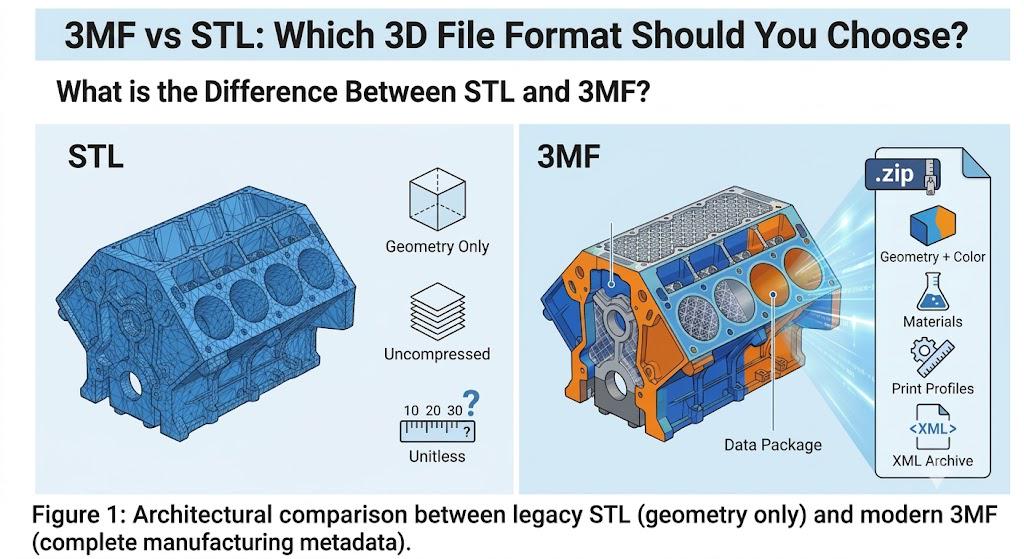
What is the Difference Between STL and 3MF?
Although both formats are engineered to store 3D mesh data for additive manufacturing, their underlying architectures and data capacities differ significantly.
What is a STL file?
Introduced in 1987, the STL (Standard Triangle Language / Stereolithography) format is the legacy foundation of 3D printing data exchange.
- Technical Architecture: An STL file represents only the surface geometry of a 3D object utilizing an unstructured triangulated surface mesh (tessellation).
- Inherent Limitations: The format is limited strictly to geometric data. It is incapable of encoding color, material properties, textures, print orientations, or volumetric data. Furthermore, because it merely lists independent triangular facets, STL files are highly susceptible to geometric corruptions—such as missing facets, inverted normals, and non-manifold edges—which frequently lead to slicing failures.
What is a 3MF file?
Released in 2015 by the 3MF Consortium, 3MF (3D Manufacturing Format) is an open-source, XML-based data format designed specifically for modern manufacturing workflows.
- Technical Architecture: A 3MF file utilizes an open XML standard and is delivered as a compressed archive (conforming to the OPC specification, similar to a .zip structure).
- Core Advantages: Beyond basic 3D geometry, a single 3MF file can encapsulate color gradients, multi-material definitions, texture maps, precise slicing parameters (e.g., support structures, infill patterns), and complex multi-part assembly hierarchies.
What separates STL files from 3MF files?
Fundamentally, an STL file is a passive geometric shell, whereas a 3MF file functions as a comprehensive, production-ready project file.
| Technical Parameters | STL Format | 3MF Format |
|---|---|---|
| Release Year | 1987 (Legacy Technology) | 2015 (Modern Manufacturing Standard) |
| Data Payload | Surface geometry only (Triangle mesh) | Geometry, color, material properties, textures, slicing parameters, multi-body assemblies |
| File Compression | Uncompressed (Binary or ASCII; file sizes scale exponentially with mesh density) | Compressed XML archive (Typically 2 to 5 times smaller than an equivalent STL) |
| Data Integrity | Prone to mesh corruption, normal inversion, and non-manifold topology | The advantage of 3MF stems from its built-in data validation, effectively preventing file corruption during transmission. Furthermore, 3MF natively supports non-manifold geometry storage, making it superior to STL |
| Unit Scale Retention | Unitless (Lacks scale metadata; frequently causes scaling discrepancies upon import) | Explicit unit definition (mm, inches, etc.), ensuring absolute dimensional accuracy | Ecosystem Compatibility | Universal (Supported by virtually all legacy and modern 3D printing software) | High (Fully integrated into industrial and desktop slicers like Bambu Studio, PrusaSlicer, Cura) |
Why Are 3MF Files Usually Smaller Than STL Files?
One of the most immediate practical benefits of migrating to the 3MF format is the drastic reduction in file size. A 3MF file is typically 2 to 5 times smaller than an equivalent STL file of the exact same geometric resolution. This file compression is achieved through two primary technical mechanisms:
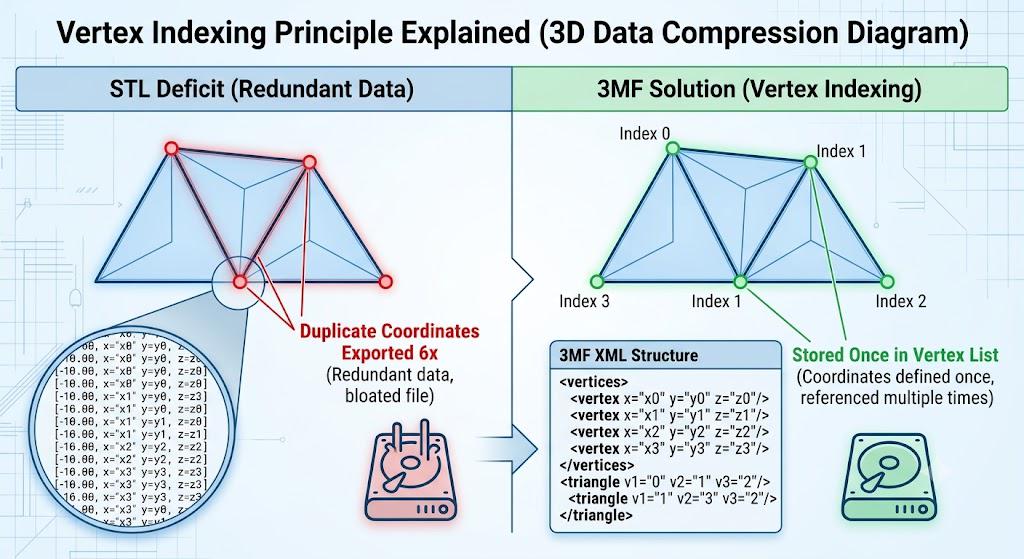
1. Vertex Indexing (Elimination of Redundant Data)
The STL format is structurally highly redundant. It defines each triangular facet independently by explicitly listing the 3D coordinates (X,Y,Z) of all three vertices, as well as the surface normal vector. In a continuous 3D mesh, adjacent triangles share the same vertices.
- The STL Deficit: If a vertex is shared by 6 neighboring triangles, STL redundantly repeats the coordinates of that exact point 6 times.
- The 3MF Solution: 3MF utilizes indexed triangle meshes. It stores all unique vertex coordinates once in a consolidated, indexed list (<vertices>). Individual triangles are then defined simply by referencing the index numbers of those vertices (e.g., <triangle v1="0" v2="1" v3="2"/>). This completely eliminates redundant coordinate data, which makes up the bulk of geometric file sizes.
Learn More: Beginner's Guide to Designing Printable 3D Models without Geometry Corruptions
2. Standardized Archive Compression (OPC & ZIP)
While a raw STL file is saved as flat ASCII text or uncompressed binary data, a 3MF file is structurally an Open Packaging Convention (OPC) container. Fundamentally, a .3mf file is a standard ZIP archive containing XML documents, texture image files, and configuration payloads. Because the XML structure is highly predictable, standard Deflate compression algorithms can compress the geometric and metadata payloads with maximum efficiency before writing them to the disk.
Software Compatibility: Which Programs Support 3MF and STL?
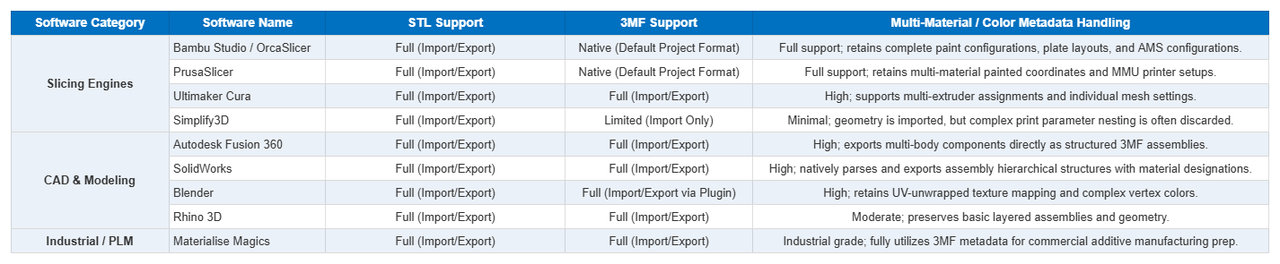
When evaluating a data format transition, software interoperability is a primary operational constraint. While STL remains universally compatible due to its age, modern CAD, PLM, and slicing software suites now offer mature, native support for 3MF.
The compatibility matrix below outlines how industry-standard software packages handle both formats:
Technical Compatibility Takeaway:
If your workflow is confined to modern desktop ecosystems (such as Bambu Lab, Prusa, or Ultimaker) or mainstream mechanical CAD packages (such as Fusion 360 or SolidWorks), 3MF is fully supported and should be treated as your primary export format. STL should be reserved solely as a fallback format for interfacing with legacy, unmaintained CNC/additive manufacturing systems.
Should I Export as STL or 3MF?
Choosing the appropriate file format depends entirely on your specific production requirements and software ecosystem.
Standardize on 3MF for the following scenarios:
- Multi-Color and Multi-Material Fabrication: When utilizing advanced hardware like the Bambu Lab AMS, Prusa MMU, or industrial multi-material systems, 3MF preserves complex material mapping and color designations.
- Standardization of Print Configurations: When distributing models across engineering teams, 3MF acts as a complete project file, preserving optimized layer heights, structural infills, and support strategies.
- High-Poly, High-Precision Meshes: For highly detailed or topology-optimized generative designs with massive polygon counts, 3MF provides superior data compression without sacrificing geometric fidelity.
- Complex Assembly Management: 3MF retains distinct component relationships and multi-body orientations directly from the CAD environment, eliminating the need to manage dozens of disparate STL files.
- Streamlining On-Demand Manufacturing (e.g., JLC3DP Automation): When uploading large-scale or highly intricate projects to industrial 3D printing service bureaus like JLC3DP, utilizing the 3MF format dramatically accelerates the automated cloud-slicing and instant quotation engine. Because 3MF natively embeds the bounding box data and scale orientation, it mitigates cloud parsing timeouts often triggered by bloated, high-poly binary STLs.
Retain STL for the following scenarios:
- Single-Material, Geometric Prototypes: For standard, homogenous parts where extra metadata (color, parameters) is redundant.
- Legacy Hardware and Proprietary Industrial Software: When interfacing with legacy industrial slicing systems or proprietary software architectures that lack the libraries required to parse XML-based 3MF payloads.
- Standard Industrial Service Bureau Uploads (JLC3DP Batch Processing): While 3MF is technically superior, the current manufacturing reality at volume production hubs like JLC3DP is still heavily anchored in massive, automated STL pipelines. For standard SLA (Stereolithography) resin or SLS (Selective Laser Sintering) nylon prototyping where no color or internal slicing metadata is required, submitting single-body, verified STL files remains the safest path to avoid automated preprocessing glitches on commercial-grade multi-part nesting software.
Will STL Become Obsolete?
The short answer is: The STL format will persist in legacy environments for the foreseeable future, but its dominance in modern manufacturing pipelines is actively declining.
- The Longevity of STL: Due to nearly four decades of market penetration, the legacy infrastructure built around STL is immense. Massive historical repositories continue to host millions of STL models, and the format remains embedded in many foundational educational curricula.
- The Shift Toward 3MF: Modern additive manufacturing has evolved toward heterogeneous materials, smart slicing automation, and cloud-integrated PLM workflows. The technical constraints of STL—specifically its inability to store units, retain metadata, or guarantee mesh integrity—present a significant bottleneck to industrial efficiency.
Major slicing applications, including PrusaSlicer, Bambu Studio, and OrcaSlicer, have already transitioned to 3MF as their default project architecture. Leading engineering platforms and model repositories are actively forcing a structural shift by incentivizing users to upload 3MF files over legacy alternatives.
Conclusion: STL remains a highly compatible but technically deficient format, analogous to the MP3 format in digital audio. 3MF represents the modern, asset-rich standard required for professional workflows. To achieve optimal data integrity, file efficiency, and process automation, engineers and designers should transition to the 3MF format.
Trending Insights: Future of 3D Printing 2026: Next-Gen Trends, Technologies & Applications

- Upload your STL, 3MF, STEP, OBJ, or other supported CAD files to JLC3DP for an instant quote. Enjoy industrial-grade 3D printing with 30+ engineering materials, fast production, and no minimum order quantity.
- 24-Hour Lead Time · Up to $123 Welcome Coupons
Frequently Asked Questions (FAQ)
Q:Why do STL models frequently exhibit severe scaling errors upon import?
This occurs because the STL specification lacks a metadata field for dimensional units. An STL file merely records numerical coordinate vectors (e.g., 10, 20, 30). If a CAD model is exported in inches and imported into a slicer calibrated to millimeters, the model will render at an incorrect scale. The 3MF format explicitly defines unit metrics within its XML header, eliminating scaling variance.
Q:Does migrating to the 3MF format compromise geometric precision?
No. 3MF utilizes a geometric representation model that is mathematically equal or superior to the standard triangle mesh used by STL. Furthermore, because 3MF enforces strict topological validation and higher numeric precision encoding, it is significantly more reliable than STL when preserving high-density geometric data.
Q: Is 3MF universally supported across all slicing software and hardware?
The vast majority of modern slicing platforms (including Bambu Studio, PrusaSlicer, Cura, OrcaSlicer, and Chitubox) offer native compatibility with the 3MF specification. However, legacy proprietary slicers or unmaintained industrial software suites may lack the capability to extract and interpret 3MF archives.
Q:Why does the industry continue to utilize STL if 3MF offers superior technical utility?
The persistence of STL is driven by institutional inertia and legacy infrastructure. Having anchored the industry for nearly 40 years, STL is deeply embedded in established manufacturing habits and historical databases. However, the commercial proliferation of advanced automated and multi-material deposition systems is rapidly accelerating the industry-wide migration toward 3MF./p>
Q: Can I Convert STL to 3MF?
Yes, you can easily convert an STL file into a 3MF file, but it is critical to understand the technical limitations of this reverse conversion. Engineering Best Practice: If you need to upgrade a legacy library of STL components to 3MF for modern manufacturing automation, perform the conversion inside your slicer, re-apply your optimized print configurations (materials, infill, orientations), and then save it as a master .3mf project file. For new designs, always export directly to 3MF straight from your native CAD environment to preserve parametric intelligence.
Keep Learning
15 Tips for Fast 3D Printing
3D printing can be time-consuming, but there are some strategies to speed up the process without sacrificing too much quality. Below are 15 practical tips to speed up your 3D printing process while maintaining decent quality. These tips are especially useful for prototyping or when speed is a priority: 1. Increase Layer Height ● Why: Thicker layers mean fewer layers overall, reducing print time. ● How: Adjust the layer height in your slicer settings. For example, go from 0.2mm to 0.3mm or higher. ● Tr......
How to prevent 3d printing warping problems
3d printing warping is one of the most common problems faced by 3d printing enthusiasts. Especially when printing larger models, the printed parts initially adhere to the print bed, but then the edges of the prints lift off the print bed and curl, causing the model to deform and waste material. The main reason for warping is that plastic materials cool and shrink when printed, which causes deformation. This article will analyze the causes of warping and use suggestions to prevent 3d printing warping t......
How to 3D Print Wood
3D printing has revolutionized the manufacturing industry by allowing the creation of complex and customized objects. While 3D printing with plastic and metal has been widely adopted, the ability to 3D print with wood has opened up new possibilities for creating aesthetically pleasing and environmentally friendly products. In this article, we will explore the process of 3D printing with wood and the techniques involved in achieving the desired results. Understanding Wood Filament The key to 3D printin......
Design for Manufacturing (DFM): 7 Principles, Process & Practical Guide
Key Takeaways Design for Manufacturing (DFM) is a design strategy that connects product requirements with manufacturing capabilities. A successful DFM approach requires choosing the right process, simplifying designs, reducing unnecessary complexity, and considering production volume from the beginning. Different manufacturing methods have unique design considerations. By applying DFM principles early, engineers can reduce redesign risks, improve product quality, shorten production cycles, and create ......
3MF VS STL: Which File Format Is Better for 3D Printing?
In the additive manufacturing industry, the STL format has served as the de facto standard for decades. However, the rapid evolution of modern 3D printing has highlighted its technical limitations. Consequently, the 3MF format—backed by an industry consortium including Microsoft, HP, and Ultimaker—has emerged as a robust, next-generation alternative. When exporting a 3D model from CAD or preparing it within a slicer, understanding the technical nuances of 3MF VS STL is critical. This article provides ......
Design for Additive Manufacturing: A Practical DfAM Guide
Key Takeaways DfAM is not DFM: Design for additive manufacturing focuses on exploiting AM's geometric freedom rather than simply simplifying parts. Build orientation matters: Orientation affects strength, surface finish, supports, thermal distortion, and overall cost. Design for the process: Wall thickness, overhangs, holes, clearances, and tolerances must match the specific AM technology and material. Complexity can reduce cost: Part consolidation, lattices, and internal channels can deliver value th......