Tree Support vs Grid Support in 3D Printing: How to Choose the Right Support Strategy
11 min
- What Is Grid Support?
- What Is Tree Support in 3D Printing?
- Tree Support vs Grid Support: Side-by-Side Comparison
- Engineering Workflow: Choose Orientation Before Support Type
- Decision Guide: Which Support Should You Use?
- When Should You Use Tree Support?
- When Is Grid Support Better?
- How Material and Geometry Affect Support Choice
- How to Tune Tree Support Settings
- Common Tree Support Problems and How to Troubleshoot Them
- FAQ about Tree Support vs Grid Support in 3D Printing
- Conclusion: Tree Support vs Grid Support
Key Takeaways
-A 45° overhang is a conservative starting point for support decisions, not a universal rule.
-Tree or organic supports use branching geometry to reach overhangs with less unnecessary contact.
-Grid-style supports generally provide broader, more continuous support beneath large areas.
-Material savings and print-time differences vary by model, orientation, slicer, interface settings, and support density.
-The best support settings should be treated as starting points and adjusted according to branch stability, removal difficulty, and supported-surface quality.
- For production parts, support strategy should be evaluated together with orientation, material selection, tolerance requirements, and post-processing.
What Is Grid Support?
In this article, "grid support" refers to conventional non-tree support structures generated as layered grid, rectilinear, or similar patterns, depending on the slicer. These structures typically extend more directly from the build plate or lower model surfaces toward the unsupported area.
Because conventional supports can create a broad and relatively continuous foundation, they are useful when a large overhang requires support across a wide area. Their main trade-off is that more contact and more material can increase removal time and leave visible marks on supported surfaces.
Main Advantages
- Provides broad support under large or relatively flat overhangs.
- Can offer a rigid foundation for geometries that are difficult to reach with narrow branches.
- Works well when supported areas need consistent coverage rather than isolated contact points.
Main Limitations
- May consume more material depending on the model and support pattern.
- Can require more removal and cleanup.
- Large contact areas may affect surface finish.
What Is Tree Support in 3D Printing?
Tree support often called organic support in some slicers is a support-generation approach that uses branching structures rather than a large continuous block of conventional support. The slicer attempts to route branches toward overhang areas while avoiding unnecessary contact with the rest of the model.
The exact structure varies between slicers and settings. Branch diameter, branch angle, tip size, wall structure, interface settings, and collision-avoidance behavior can all influence how stable the support is and how easily it can be removed.
How Does Tree Support Work?
1.The slicer identifies regions that may require support based on the selected overhang and support settings.
2. It generates branches or trunks that can reach those regions while navigating around the model geometry where possible.
3. As branches approach the supported area, the slicer creates smaller contact regions or interfaces according to the selected support style and parameters.
4. After printing, the support is removed and the contact areas are cleaned as required.
The practical benefit is not that tree support always uses less material or always leaves fewer marks. Instead, its geometry can be more efficient when only specific regions of a complex model need to be reached.
Tree Support vs Grid Support: Side-by-Side Comparison
| Factor | Tree / Organic Support | Grid / Conventional Support |
|---|---|---|
| Support geometry | Branching structures that reach localized areas | Broader, more continuous structures beneath unsupported areas |
| Best suited for | Complex, curved, decorative, or localized overhangs | Large, flat, or broadly unsupported regions |
| Material use | Can be lower for some geometries | Can be higher when large support volumes are generated |
| Removal | Often easier when contact is localized | May require more removal where contact area is large |
| Surface impact | Can reduce unnecessary contact, depending on settings | Broader contact can leave more supported-surface marks |
| Stability | Depends heavily on branch geometry and height | Broad support geometry can provide a more rigid foundation |
| Key tuning factors | Branch angle, diameter, tip/contact settings, interface | Pattern, density, interface, contact distance |
Engineering Workflow: Choose Orientation Before Support Type
For functional or production-oriented parts, the first question should not always be "tree or grid?" In many cases, changing the print orientation can reduce support volume, move support contact away from critical surfaces, shorten print time, or improve dimensional results.
A practical engineering workflow is:
1. Identify critical surfaces, tolerances, and load directions.
2. Evaluate possible print orientations.
3. Estimate unsupported regions and bridging requirements.
4. Compare tree and conventional support in the slicer preview.
5. Review material use, print time, support accessibility, and expected surface quality.
6. Run a small validation print when the part is high-value or production-critical.
Decision Guide: Which Support Should You Use?
| Model Features | Recommended Solution | Why |
|---|---|---|
| Complex curved surfaces | Tree / Organic Support | Branches can reach localized overhangs with less unnecessary contact |
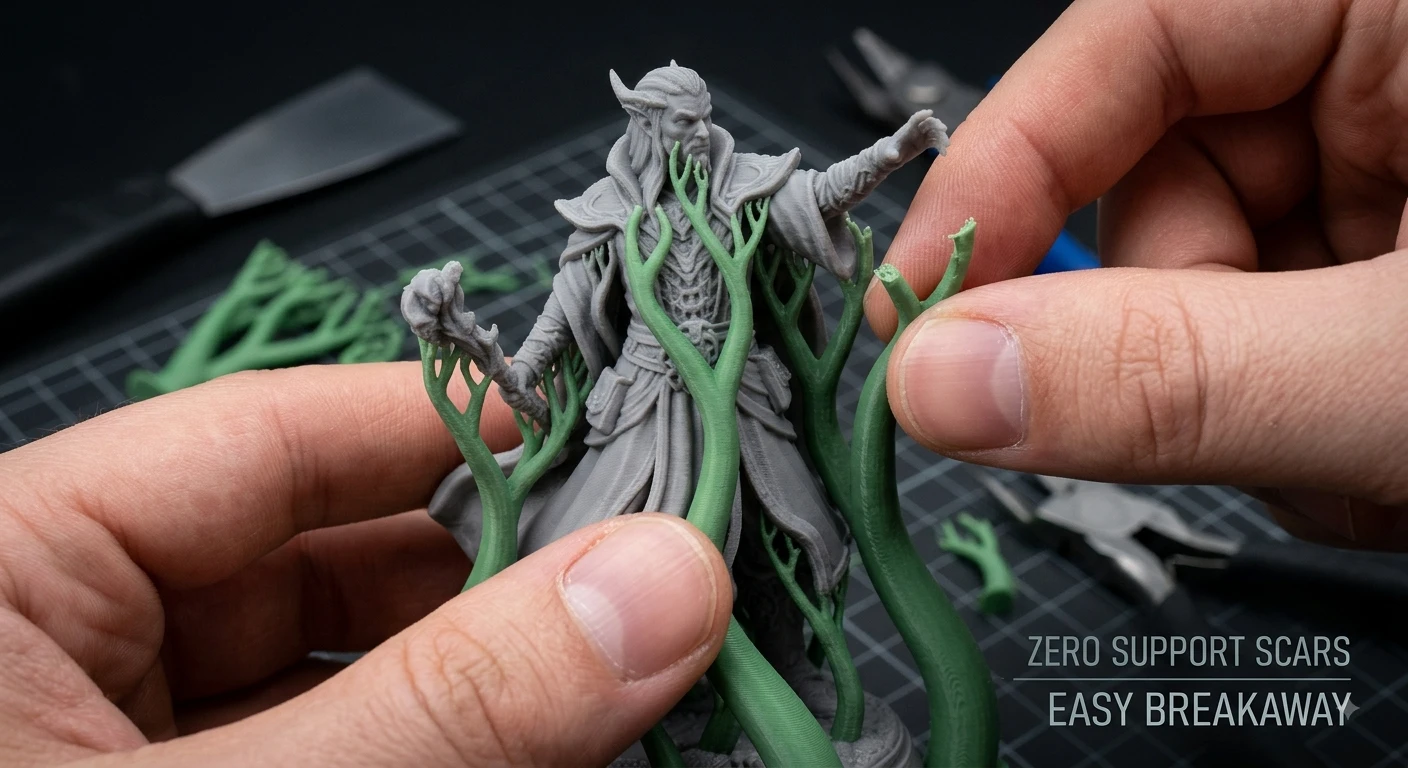
| Miniatures or figurines | Tree / Organic Support | Useful for detailed geometry and isolated overhangs |
| Large flat overhangs | Grid / Conventional Support | A broad support foundation may provide more uniform coverage |
| Tall and narrow support paths | Evaluate branch stability carefully | Branch angle, diameter, height, and adhesion become critical |
| Expensive material | Compare slicer estimates | Actual material savings depend on the generated support geometry |
| Difficult-to-access support areas | Tree / Organic Support or redesign | Branch routing may improve accessibility, but removal still needs to be considered |
| Functional engineering parts | Evaluate orientation first | Changing orientation can sometimes reduce or eliminate support requirements |
When Should You Use Tree Support?
Tree support is often worth testing when the model contains localized overhangs that are difficult to reach with a large conventional support block.
Typical Use Cases
- Miniatures and figurines with arms, accessories, facial features, or other detailed geometry.
- Organic sculptures and curved exterior surfaces.
- Decorative parts where reducing unnecessary support contact is important.
- Models with multiple isolated overhang regions that can be reached by a branching network.
However, tree support should not be selected automatically. If branches become too tall, thin, or aggressively angled, the generated structure may become unstable. In those cases, changing orientation, increasing branch stability, or using a different support strategy may be more effective.
When Is Grid Support Better?
Conventional grid-style support can be a better choice when the unsupported region is large enough that localized branches do not provide the required coverage or stability.
Typical Use Cases
- Large, relatively flat overhangs.
- Broad internal ceilings or cavities.
- Mechanical parts where a wide supported region needs more uniform coverage. Learn how to optimize strength in Choosing the Right Infill Structure for 3D Printing.
- Models where tree branches become excessively tall or unstable.
For engineering polymers such as ABS, ASA, or Nylon, support selection should not be considered separately from the overall thermal environment. Enclosure conditions, material shrinkage, drying, bed adhesion, print orientation, and geometry can all affect the outcome. A conventional support pattern may provide a more stable base for some parts, but it is not automatically the correct choice simply because a material has high shrinkage.
How Material and Geometry Affect Support Choice
PLA and PETG
PLA and PETG respond differently to cooling, bridging, and support removal. A support strategy that works well for PLA may leave a different surface finish or require different contact settings for PETG. Test prints are useful when the supported surface is visually important.
ABS and ASA
For ABS and ASA, warping and thermal stability can be as important as the support pattern itself. A stable enclosure, suitable bed adhesion, and correct orientation should be addressed before assuming that a stronger support pattern will solve the problem.
Nylon and Other Engineering Polymers
Engineering materials can introduce additional variables such as moisture sensitivity, shrinkage, chamber conditions, and higher processing temperatures. Evaluate support stability as part of the entire manufacturing setup rather than as an isolated slicer setting.
How to Tune Tree Support Settings
There is no single set of best tree support settings for every printer or material. The settings below should be treated as a tuning workflow rather than universal numbers.
| Setting | Practical Starting Point | Adjusted |
|---|---|---|
| Top Z Distance | Start near the slicer default and relate it to layer height | Increase if removal is difficult; decrease if the supported surface sags excessively |
| Branch Diameter | Start with the default profile | Increase for tall or unstable branches; reduce only when stability remains sufficient |
| Branch Angle | Use a conservative angle first | Reduce if branches are unstable; increase cautiously when more horizontal reach is required |
| Tip / Contact Size | Start with the slicer default | Reduce to limit marks where stability allows; increase if contact is insufficient |
| Support Interface | Enable when supported-surface quality requires it | Increase density cautiously because removal can become more difficult |
| Support Brim | Use when the support base is narrow or tall | Increase bed contact when supports show movement or poor adhesion |
Cura: Tree Support
In Cura, begin with the Tree support profile and inspect the generated preview before printing. Focus on whether branches have enough thickness, whether their angle creates unstable unsupported paths, and whether the contact regions are positioned where cleanup is acceptable.
- Support Structure: Tree
- Branch Angle: Start from the active profile rather than assuming one universal value
- Branch Diameter: Increase when tall branches appear unstable
- Top Z Distance: Adjust relative to layer height and material behavior
- Support Interface: Use when the supported surface requires better quality
Bambu Studio and OrcaSlicer: Tree Support
Bambu Studio and OrcaSlicer offer multiple tree-support behaviors and profiles. Start with the slicer profile appropriate for your material and inspect the preview for branch reach, support density, contact area, and potential collisions.
- Choose a tree-support type based on the desired balance between material use and structural stability.
- Use the slicer preview to identify overly thin or unsupported branches.
- Adjust top contact distance according to layer height and desired removal behavior.
- Increase interface strength only when supported-surface quality requires it.
PrusaSlicer: Organic Support
PrusaSlicer uses the Organic support designation. Organic support parameters should be tuned as a system: branch angle influences reach and stability, branch diameter affects structural rigidity, and tip/contact settings influence both surface marks and removal behavior.
- Style: Organic
- Branch angle: Start from the profile and reduce if generated branches become unstable
- Branch diameter: Increase when height or geometry requires more rigidity
- Tip/contact size: Balance surface finish against reliable support contact
- Inspect the preview before printing to identify unsupported or difficult-to-remove regions
Slicer Comparison: Choosing between slicers? Check out our breakdown on OrcaSlicer vs Prusa, Bambu & Cura Comparison.
Common Tree Support Problems and How to Troubleshoot Them
Tree Support Collapses or Falls Over
- Check bed adhesion and add a support brim if the support base is too narrow.
- Increase branch diameter or reduce aggressive branch angles.
- Review print speed and acceleration if slender branches are vibrating or being disturbed.
- Inspect the slicer preview for branches that become excessively tall or unsupported.
Tree Support Is Too Difficult to Remove
- Increase the support contact distance gradually.
- Review interface density and reduce it if removal is excessively difficult.
- Check whether the material requires different contact settings from the current profile.
Supported Surfaces Look Rough
- Reduce the support gap carefully if the model is sagging too far before reaching the support.
- Test a suitable support interface.
- Consider reorienting the part so critical cosmetic surfaces do not require support.

- Starting From $0.3 per part · No Minimum Order Quantity
- 24-Hour Lead Time · Up to $123 Welcome Coupons
FAQ about Tree Support vs Grid Support in 3D Printing
Q: Is tree support always better than grid support?
No. Tree support is often useful for complex or localized overhangs, while grid-style support can provide broader coverage beneath large or relatively flat unsupported areas. Geometry, orientation, material, and support stability determine the better option.
Q: Does tree support always use less filament?
Not always. Tree support can reduce unnecessary support volume for some models, but the actual result depends on geometry, orientation, slicer settings, support interface, and the generated branch network. Compare slicer estimates for the same model and print conditions.
Q: Why did my tree support collapse?
Common causes include insufficient bed adhesion, branches that are too thin or aggressively angled, excessive height, vibration, nozzle interference, or settings that are not appropriate for the selected material. Inspect the sliced preview and increase structural stability before making large changes to contact settings.
Q: How do I stop tree support from fusing to the model?
Adjust the support contact distance relative to layer height, review interface density, and test the material profile. If removal is too difficult, increase separation gradually; if the supported surface sags excessively, reduce the gap carefully.
Q: What is the best tree support setting?
There is no universal best setting. Start with the slicer's material profile, then adjust branch stability, contact distance, interface behavior, and removal performance based on the specific geometry and print result.
Conclusion: Tree Support vs Grid Support
Tree support and grid support solve different geometry problems. Tree or organic support is often effective for complex shapes, decorative parts, and localized overhangs where reducing unnecessary contact is useful. Conventional grid-style support can be more appropriate when a large unsupported region needs broad and stable coverage.
The most reliable approach is to evaluate geometry and orientation first, then compare support strategies in the slicer preview. Material, layer height, cooling, support contact settings, and post-processing requirements should all be considered before selecting a final strategy.
For complex or production-critical parts, support selection should be part of a broader manufacturing decision that includes orientation, material, process, tolerances, surface requirements, and post-processing.
Keep Learning
Dual Extruder 3D Printer: Types, Principles and Tips
In the 3D printing industry, with the development of dual-extrusion technology, engineers can now use dual extruder 3d printers to print parts composed of two or more materials. Compared with traditional single-extrusion printers, dual extruder 3d printers have significant advantages in functionality and application range, but at the same time, design difficulty and maintenance costs also increase. This article introduces the types, working principles, advantages and disadvantages, and printing techni......
Low Volume Manufacturing with 3D Printing: Benefits and Applications
Key Takeaways Cost-Effective Production: 3D printing eliminates expensive tooling costs, making low volume manufacturing economically viable. Faster Time-to-Market: Production can begin within days instead of weeks. Design Flexibility: Complex geometries and customization are achievable without additional tooling costs. Low volume manufacturing bridges the gap between prototyping and mass production. It is useful when companies need smaller production runs, want to test a product before investing in t......
How to Turn a Photo Into a 3D Model: AI, Photogrammetry & 3D Scanning
Quick Overview You can convert a regular photo into a usable 3D model using AI image generation, multi-photo reconstruction, photogrammetry, or 3D scanning. For most creators and beginners, the simplest workflow is straightforward: prepare your photo, generate a 3D model, inspect every angle, fix geometry issues, and export. Single-image AI tools work best for fast visual results. If you need precise shapes, complete object coverage, or accurate real-world dimensions, multi-photo reconstruction, photo......
Tree Support vs Grid Support in 3D Printing: How to Choose the Right Support Strategy
Key Takeaways -A 45° overhang is a conservative starting point for support decisions, not a universal rule. -Tree or organic supports use branching geometry to reach overhangs with less unnecessary contact. -Grid-style supports generally provide broader, more continuous support beneath large areas. -Material savings and print-time differences vary by model, orientation, slicer, interface settings, and support density. -The best support settings should be treated as starting points and adjusted accordi......
How Accurate is FDM 3D Printing for Prototyping?
When speed and affordability matter, FDM 3D printing often takes center stage in prototyping. But there's one question that comes up time and again, how accurate is FDM 3D printing really? If you're developing a functional prototype, testing fitment, or evaluating mechanical properties, understanding the accuracy of 3D printing, especially FDM, can be the difference between a reliable test piece and a misleading mockup. (souruce: Unsplash) What is FDM 3D Printing? FDM (Fused Deposition Modeling) is a ......
Exploring the Potential of FDM for Flexible 3D Printing
What is flexible 3D printing? The term "flexible 3D printing" describes the technique of producing three-dimensional goods with materials that have elasticity and may compress, bend, or stretch. FDM 3D Printing Flexible FDM 3D printing makes use of Fused Deposition Modelling (FDM) to create three-dimensional things out of flexible and elastic materials. varying degrees of flexibility and durability can be produced by adapting FDM printers to accept flexible filaments such as thermoplastic elastomers (......