Top 5 3D Printer Tables of 2026: Boosting Your 3D Printing Experience
19 min
- Best 3D Printer Tables in 2026
- How We Chose the Best 3D Printer Tables
- What Does a Good 3D Printer Table Need?
- 3D Printer Table vs Workbench vs Stand vs Desk
- How Big and Strong Should a 3D Printer Table Be?
- How to Make a 3D Printer Table More Stable
- Do You Need a Special Table for a 3D Printer?
- H2: How to Choose a 3D Printer Table for Your Setup
- 3D Printer Table FAQs
- Conclusion
Choosing the right table for your 3D printer that enhances printing stability, reduces noise, and provides organized storage space is important for achieving high-quality prints and optimizing your workflow. In this guide, we'll look at what makes a good 3D printer table and recommend the best 3D printer tables on the market in 2026.
Below are our top five 3D printer tables and stands for 2026, highlighting their features, benefits, and why they might be perfect for your printing space.
Best 3D Printer Tables in 2026
Quick Comparison Table
| Product | Best For | Type | Storage | Mobility | Price |
|---|---|---|---|---|---|
| Seville Classics LED Lighted Pegboard Workcenter | Best Overall | Workbench | High | Low | $470 |
| Safco Deskside 3 Tier Rolling Cart | Best Budget | Printer Stand | Medium | High | $136.79 |
| Seville Classics UltraHD Rolling Cabinet Workbench | Best Storage | Workbench | Very High | High | $799.89 |
| Seville Classics UltraHD Workbench | Best Heavy-Duty | Workbench | Medium | Low | $259.99 – $340 (varies by size) |
| 2x4 Basics 90164MI Custom Workbench | Best DIY | Custom Workbench | Custom | Low | $175.99 |
1Best Overall 3D Printer Table
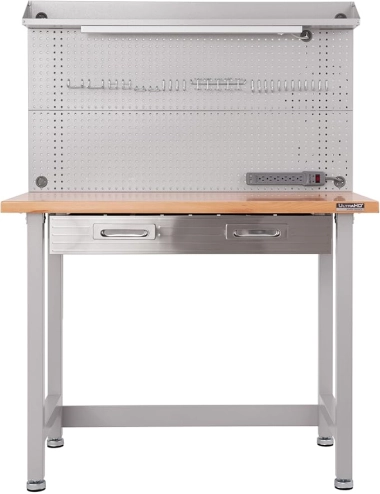
Seville Classics LED Lighted Pegboard Workcenter
Source: https://www.amazon.com/dp/B005NAVFEW
| Size | 48"D x 24"W x 65.5"H |
|---|---|
| Total weight capacity | 500 pounds |
| Price | $470 |
This workbench features a sturdy steel structure with a thick wooden work surface, fluorescent lighting, and a cantilevered top shelf. It's especially well suited for 3D printing work, offering a huge pegboard for hanging tools for easy access at all times. The table comes with a surge protector, six power outlets, and two USB ports, making it easy to connect 3D printers, UV curing stations, and more. It can handle an evenly distributed 500 pounds of weight, and the drawers can hold up to 60 pounds. Whether it's storing tools or placing printing accessories, this workbench provides ample support.
Why Do We Recommend It?
Its combination of a rigid steel frame, 500-pound load capacity, large work surface, and integrated pegboard storage makes it a well-rounded choice for most dedicated 3D printing setups. The built-in power outlets and USB ports also make it practical for connecting printers and other accessories in one workstation.
2Best Budget 3D Printer Table
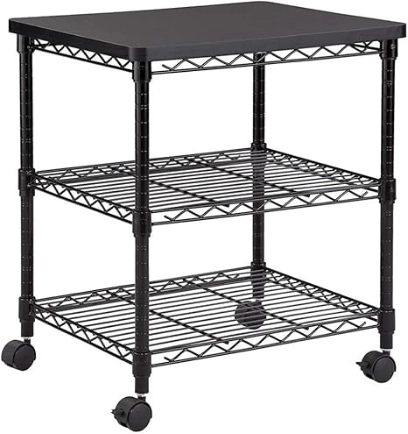
Safco Deskside 3 Tier Rolling Cart Printer Stand
Source: https://www.amazon.com/dp/B00GRMG2FM
| Size | 24"D x 20"W x 27"H |
|---|---|
| Total weight capacity | 200 pounds |
| Price | $136.79 |
This printer stand with wheels is an economical option for small 3D printers like the Ender 3v2 or small resin printers. Originally designed for office equipment, its solid build quality makes it equally suitable for 3D printing. The workbench consists of three shelves, the top shelf can support 100 pounds, and the bottom shelf can support 50 pounds each. The mesh design on its bottom allows for better ventilation. Four swivel wheels make the workbench more mobile. This table is a good choice for 3D printing beginners with limited budgets and small space.
Best for: Small desktop 3D printers and space-constrained setups.
Why Do We Recommend It?
Its compact three-tier design provides a practical way to organize a small 3D printer, filament, and tools without requiring a large workspace. Four swivel casters also make it easy to reposition the setup, making it a suitable option for beginners and space-constrained users.
3Best 3D Printer Table With Storage
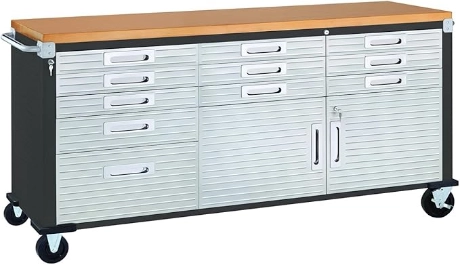
Seville Classics UltraHD Heavy Duty Rolling Cabinet Workbench Table
Source: https://www.amazon.com/dp/B07GYY2SSC
| Size | 20"D x 77"W x 37.5"H |
|---|---|
| Total weight capacity | Not mentioned |
| Price | $799.89 |
This heavy-duty rolling workbench from Seville Classics is elegant and practical, suitable for accommodating multiple 3D printers and accessories at the same time. It comes with 11 drawers that can be used to store various tools and spare filament spools, ensuring a neat and organized workspace. In addition, it comes with a double-door cabinet and adjustable shelves for more storage space. The tabletop is coated to prevent fingerprints, and the drawers and cabinets are lockable to enhance equipment safety. It is equipped with five heavy-duty wheels, two of which are lockable, which makes it easy to move quickly and fix the table position. Overall, this workbench is perfect for 3D printing environments that require a lot of storage space and high-intensity use.
Why Do We Recommend It?
With 11 drawers, a double-door cabinet, adjustable shelving, and a large work surface, this workbench offers significantly more integrated storage than a basic printer table. Its heavy-duty frame and locking casters also make it well suited to workshops with multiple printers, tools, and accessories.
4Best Heavy-Duty 3D Printer Workbench
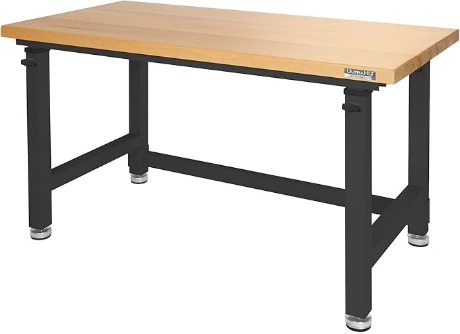
Seville Classics UltraHD Heavy Duty Workbench Table
Source: https://www.amazon.com/dp/B083F89LYD
| Size |
60"W x 24"D x 28.5"–42"H (adjustable height) 48"W x 24"D x 28.5"–42"H (adjustable height) 60"W x 24"D x 28.5"–42"H (adjustable height) 72"W x 25"D x 28.5"–42"H (adjustable height) 72"W x 25"D x 37.5"H (fixed height) |
|---|---|
| Total weight capacity | Supports up to 1,000 pounds |
| Price | $259.99 – $340 (varies by size) |
This adjustable height workbench is also suitable for large 3D printers. Its height can be easily adjusted from 28.5 inches to 42 inches, and it has a maximum load capacity of 1,000 pounds, which can meet the needs of large-scale 3D printing. The tabletop is made of sturdy wood material and provides a stable work surface. Although there are no additional drawers or cabinets for storing 3D printing materials, its large desktop area is enough to accommodate multiple printers and accessories, making it an ideal choice for users who want to flexibly adjust the height of the workbench.
Best for: Heavy 3D printers, enclosed printers, or multiple-printer setups.
Why Do We Recommend It?
Its adjustable height, large tabletop options, and high load capacity make it a strong choice for heavy printers or multi-printer setups. The rigid workbench design provides a more stable foundation than lightweight desks or compact printer stands, particularly when equipment and accessories add substantial weight.
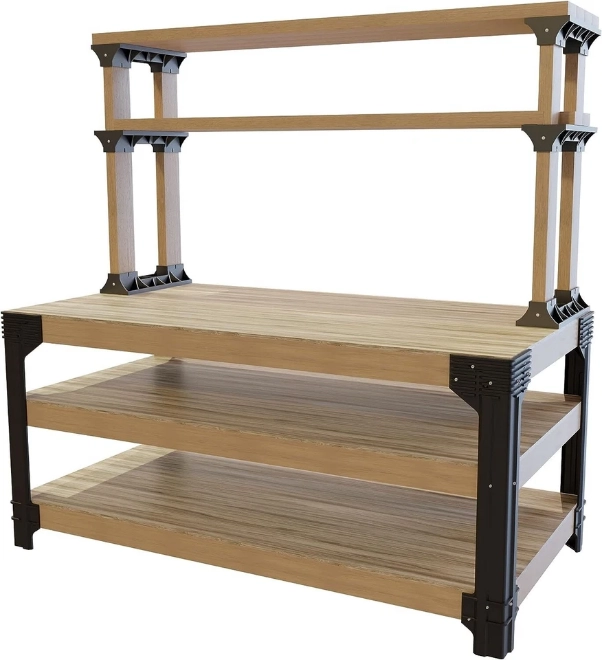
5Best DIY 3D Printer Workbench
2x4 Basics 90162ONLMI Custom Workbench
Source: https://www.ebay.com/itm/315723786205
| Size | 13"D x 13.5"W x 35.5"H |
|---|---|
| Total weight capacity | 1000 pounds |
| Price | $175.99 |
If you need a completely customized 3D printing workbench, the 2x4 Basics custom workbench will be your best choice. This workbench comes with five workbench legs and six shelf links, and you can set and adjust the configuration as needed to create the work environment that best suits you. Although it requires you to provide your own wood to assemble, it also means that you can completely customize the desktop and storage space according to your needs. The workbench's bracket is made of heavy resin structure and can withstand up to 1,000 pounds, which is very suitable for DIY enthusiasts and users with certain experience. For those who like personalized configuration and are willing to spend time to assemble it by themselves, the 2x4 Basics custom workbench will be an ideal choice.
Why Do We Recommend It?
Its modular design allows users to build a work surface and storage layout around their available space and specific printer setup. Because the tabletop is user-supplied, it is particularly suitable for DIY users who want to customize the dimensions, materials, and configuration of their 3D printing workstation.
How We Chose the Best 3D Printer Tables
We evaluated these tables using manufacturer specifications and their suitability for common 3D printing setups, focusing on stability, load capacity, workspace, storage, mobility, and adjustability.
| Criterion | Why It Matters |
|---|---|
| Stability | Helps minimize unwanted movement |
| Load Capacity | Supports printer + accessories + storage |
| Size | Provides enough operating and maintenance space |
| Storage | Keeps tools and materials organized |
| Mobility | Allows equipment to be moved when needed |
| Adjustability | Helps users adapt the workspace |
What Does a Good 3D Printer Table Need?
1. Stability and Vibration Resistance
A rigid, stable table helps reduce unwanted movement and vibration during printing, which can be especially useful for high-speed printing or tall, vibration-sensitive parts.
A truly stable 3D printer table depends on five key elements: a rigid frame, a solid tabletop, adjustable feet, locking casters, and a low center of gravity. If stability is your top priority, looking for a heavy-duty, sturdy table will ensure long-term print accuracy and reliability.
2. Noise reduction
A sturdy table can help reduce secondary noise caused by vibration transferring into the table or floor. Anti-vibration pads may further reduce high-frequency vibration, but they should not be used as a substitute for a rigid, stable table.
If further noise reduction is needed, pairing your set-up with a dedicated printer enclosure will offer complete acoustic dampening.
3. Storage
A 3D printer table with storage keeps your workspace organized and efficient. Choosing a 3D printer workbench with storage provides integrated space for:
- Filament Spools: Shelves or dry boxes can help organize active and spare filament spools. For more information, see our guide to [filament storage and drying].
- Tools & Spare Parts: Drawers for scrapers, flush cutters, Allen wrenches, and spare nozzles. Drawers can keep [3D printer tools and accessories], such as scrapers, flush cutters, Allen wrenches, and spare nozzles, organized and within easy reach.
- Build Plates & Cleaning Supplies: Dedicated slots for extra PEI plates, IPA, and microfiber cloths.
4. Load capacity and durability
Don't just look at table size—check its load capacity. A quality heavy-duty 3D printer table must easily and stably support your printer. Opt for heavy-gauge steel, solid wood, or thick laminate tops, and stay away from flimsy plastic or thin hollow boards that bend under weight.
5.Size and Workspace
Make sure the table fits the size of your printer and has enough space for materials and tools.
However, remember that printer footprint does not equal required table size. To choose the right surface, always calculate:
- Printer Footprint: The actual dimensions of the printer's base.
- Bed Clearance: Extra depth for moving heatbeds, cables, or rear-mounted spool holders.
- Filament & Maintenance Access: Clear space around the machine to swap spools, clear jams, and reach side switches.
- Workspace Margin: Extra tabletop area for tools, parts, and active projects.
6. Mobility and Adjustability
Adjustability adds flexibility to your 3D printing setup. Look for these practical features to customize your workspace:
- Height-Adjustable Legs: Set comfortable working heights for maintenance and reduce back strain.
- Wheels & Locking Casters: Move heavy setups easily for cleaning or lock them in place for stable printing.
- Modular Shelving: Adapt storage layouts as your printer accessories and tool collections grow.
3D Printer Table vs Workbench vs Stand vs Desk
Now that we know what makes a good 3D printer table, the next question is: What type of table should you choose? The right option depends on your printer's size and weight, available workspace, storage needs, and whether you need to move your printer regularly.
Use the comparison below to find the setup that best fits your needs.
| Type | Best For | Stability | Storage | Mobility |
|---|---|---|---|---|
| 3D Printer Table | General 3D printing | High | Medium | Medium |
| Workbench | Heavy printers and multiple printers | Very High | High | Low |
| Printer Stand | Small desktop printers | Medium | Medium | High |
| Desk | Home and office setups | Medium | Medium | Low |
| Rolling Cart | Mobile 3D printing setups | Medium | High | High |
3D Printer Table
A 3D printer table is a practical choice for most single-printer setups. It typically provides a dedicated, stable surface while leaving enough room for filament, tools, and accessories. Choose a table with a rigid frame, sufficient load capacity, and enough tabletop space for your printer and necessary clearance. A model with shelves or drawers can also provide convenient storage.
Best for: General-purpose 3D printing, hobbyists, and single-printer setups.
Workbench
A 3D printer workbench is better suited to heavy printers, enclosed machines, or setups with multiple printers. Workbenches generally offer a more rigid frame and higher load capacity than lightweight tables. They can also provide additional workspace for printer maintenance, post-processing, and tools. If stability is your top priority, a heavy-duty workbench is often the better choice.
Best for: Heavy-duty printers, multiple printers, workshops, and users who need extra workspace.
Printer Stand
A 3D printer stand is a compact option for smaller desktop printers. Many printer stands use multiple shelves to provide space for the printer, filament, and accessories without requiring a large work surface. Rolling models are especially useful when you need to move your printer or rearrange a small workspace.
Best for: Small 3D printers, limited spaces, and budget-conscious setups.
Desk
A 3D printer desk can work well if you already have a sturdy desk available. You do not necessarily need a dedicated 3D printer table as long as the desk can safely support the printer and provides enough space for operation, ventilation, cables, and maintenance. Avoid lightweight or flexible desks that may move or wobble during printing.
Best for: Home offices, desktop printers, and users who want to combine printing with other workspace activities.
Rolling Cart
A rolling cart is useful when mobility is more important than maximum stability. It allows you to move a printer between work areas and can provide shelves for filament, tools, and accessories. However, make sure the cart has a rigid frame and locking casters, and lock the wheels before printing.
Best for: Mobile workspaces, compact setups, and users who frequently need to reposition their printer.
Which 3D Printer Table Type Should You Choose?
For most users, a sturdy 3D printer table is a good all-around choice. Choose a workbench if you have a heavy printer or multiple machines, a printer stand if space is limited, and a desk if you already have a suitable workspace. If you need to move your printer regularly, consider a rolling cart with locking casters.
How Big and Strong Should a 3D Printer Table Be?
A larger table is not necessarily better for a 3D printer. A table that is too small restricts your workspace, while an under-rated table can wobble or flex under load. Choose a table that provides enough surface area and load capacity for your specific printer setup. Use the benchmarks below to calculate your setup requirements:
| Aspect | Setup Type / Item | Recommended Benchmark | Why It Matters / What to Calculate |
|---|---|---|---|
| Table Size | Small Setup (e.g., Ender 3, small resin) | 24" x 24" (60 x 60 cm) | Accommodates machine base & immediate cable strain relief. |
| Medium to Large Setup (CoreXY, enclosed) | 30" x 36" (75 x 90 cm)+ | Fits a larger frame and allows working space. | |
| Clearance Needs | Extra 6"–12" depth & width | — | Space for Y-axis bed travel, rear spools, door swings & maintenance. |
| Load Capacity | Printer Weight | 15–35 lbs (standard) / 50–100 lbs (industrial) | Core weight of machine and build plate. |
| Enclosure & Accessories | 15–30 lbs | Acrylic/metal covers and top-mounted accessories. | |
| Storage Items | 15–25 lbs | Weight of 5–10 filament spools + tools on shelves. | |
| Safety Margin | +30% to 50% extra capacity | Essential buffer to absorb dynamic vibrations during fast printing. | |
| Rating Target | Single Printer Setup | 150–200 lbs weight capacity | Ensures a sturdy table for 3d printer use without flexing. |
| Multi-Printer Station | 500–1,000 lbs weight capacity | Heavy-gauge steel 3d printer workbench for maximum stability. |
Note: The dimensions are practical starting points rather than universal requirements. Always check the printer manufacturer's clearance recommendations.
Pro Tip for High-Speed & Multi-Color Printers:
- Height: Aim for a table height of 30"–36" for ergonomic maintenance.
- Vertical Clearance: If using multi-material systems (like AMS), ensure at least 12"–15" of top clearance above the printer.
- Extra Mass: A heavy, rigid slab can sometimes help increase system mass and reduce noticeable movement, but it should only be used if the table is designed to support the additional load.
How to Make a 3D Printer Table More Stable
Here are practical ways to reinforce your 3d printer workbench and help minimize unwanted movement and vibration:
- Level the Table: Ensure the surface is perfectly flat and all feet or glides make firm, even contact with the ground to prevent micro-wobbles.
- Lock the Casters: If your table for 3d printer has wheels, lock all casters before starting a job to eliminate horizontal movement.
- Place on a Solid Floor: Position your 3d printer workbench on concrete or hardwood rather than thick rugs or flexy subfloors that amplify dynamic movement.
- Keep Heavy Items Low: Store heavy filament spools and toolkits on lower shelves to pull down the center of gravity and anchor the frame.
- Avoid Excessive Overhang: Center your printer directly over the primary supporting legs rather than near unsupported edges to reduce leverage flex.
- Use Anti-Vibration Pads Carefully: Anti-vibration pads can help isolate high-frequency vibration, but overly soft pads may reduce overall stability. For high-speed printers, prioritize a rigid, level table before adding isolation materials.
Do You Need a Special Table for a 3D Printer?
Not necessarily. A dedicated 3D printer table is convenient, but a sturdy, level desk or workbench can work well if it safely supports the printer and provides enough space for operation and maintenance.
Where you place your printer also matters. See our guide to [3D printer placement] for tips on choosing a suitable location and workspace.
What Makes a Normal Desk Suitable?
To use an existing desk or table safely, ensure it meets these key requirements:
- Sufficient Load Capacity: Capable of holding the printer, spools, accessories, and dynamic motion forces.
- Rigid Construction & Stable Legs: Heavy-duty frame with no side-to-side sway or wobbling legs.
- Adequate Tabletop Size & Clearance: Provides full machine footprint support plus space for Y-axis bed movement, cables, and tool access.
- Suitable Location: Positioned on a solid, level floor away from high-traffic zones or heavy drafts.
Suitable Alternatives
If you choose not to buy a specialized table for 3d printer setups, these standard options work well:
- Solid Wood Desk: Offers dense weight and natural vibration dampening.
- Steel Workbench: Delivers maximum frame rigidity and high weight ratings.
- Heavy-Duty Utility Table: Provides a cost-effective, solid surface for smaller setups.
- Sturdy Shelving/Workbench System: Excellent for multi-printer or vertical storage setups.
Tables to Avoid
Steer clear of these surfaces, as they introduce severe swaying, print defects, or tipping hazards:
- Lightweight Folding Tables: Lack structural rigidity and wobble excessively during fast prints.
- Unstable Plastic Tables: Flex under load and transfer vibrations back into the printhead.
- Narrow Surfaces: Leave zero clearance for bed travel, rear spools, or cable strain relief.
- Visibly Flexible Desks: Bend under weight, causing bed leveling issues.
- Unlocked Rolling Carts: Shift horizontally during printing, causing major layer shifts.
H2: How to Choose a 3D Printer Table for Your Setup
Use this simple decision framework to quickly identify the best table type for your specific setup without needing to re-read every detailed product review:
| Your Setup | Recommended Table Type | Key Feature to Prioritize |
|---|---|---|
| One small desktop printer | Compact printer table or sturdy desk | Space-saving footprint & basic stability |
| One enclosed printer | Large, rigid table | Extra depth for door clearance & cable management |
| Heavy printer | Heavy-duty workbench | High weight rating (200+ lbs) & thick top |
| Multiple printers | Wide workbench | Rigid frame to minimize shared vibration transfer |
| Limited space | Compact table or rolling cart | Small footprint with multi-tier vertical storage |
| Need tool/filament storage | Table with shelves/drawers | Integrated pegboards, drawers, or lower racks |
| Frequently move equipment | Rolling table with locking casters | Heavy-duty swivel wheels with secure foot locks |
| Workshop environment | Heavy-duty workbench | All-steel frame, chemical-resistant top & power strip |
If you are planning a larger setup, see our guide to [starting a 3D printing farm].
3D Printer Table FAQs
Q: What is the best table for a 3D printer?
The best table depends on your 3D printer's weight, size, stability requirements, storage needs, and available space. A sturdy, level table with enough surface area is generally a good choice.
Q: Does a 3D printer need a sturdy table?
Yes. A stable, rigid table helps reduce movement and vibration during printing, especially for larger or heavier 3D printers.
Q: How much weight should a 3D printer table support?
Choose a table with a weight capacity that exceeds the combined weight of the printer, enclosure, accessories, and stored items, with an appropriate safety margin.
Q: What size table do I need for a 3D printer?
The table should be larger than the printer's footprint and leave enough room for cables, controls, filament, ventilation, and routine maintenance.
Q: Are rolling tables good for 3D printers?
Rolling tables can be useful if you need to move your printer. Choose one with a rigid frame and locking casters to keep the printer stable during operation.
Q: Can I use a regular desk for a 3D printer?
Yes. A regular desk can work if it is stable, level, strong enough to support the printer, and large enough to provide the necessary clearance.
Q: What is the best 3D printer table with storage?
The best option depends on what you need to store. Look for a table with enough shelf or cabinet space for filament, tools, accessories, and other supplies while maintaining a stable surface for the printer.
Conclusion
Choosing the right 3D printer table is crucial to improving printing stability and work efficiency. If you don't have your own 3D printing equipment, you might consider using JLC3DP's online 3D printing service. JLC3DP provides customers who do not have printing conditions with a one-stop printing solution from design to finished product, supporting a variety of needs from personal creativity to commercial projects.

- Starting From $0.3 per part · No Minimum Order Quantity
- 24-Hour Lead Time · Up to $123 Welcome Coupons
Keep Learning
How Much Does 3D Printing Cost? A Complete Breakdown
We get this question a lot at JLC3DP: “How much does 3D printing cost?” And here’s the truth: Some projects can be surprisingly cheap, while others cost more than you’d expect. There’s a myth floating around that 3D printing is basically free once you own a printer. (If only it were that simple, right?) The reality is, whether you’re printing at home or outsourcing to a service like ours, the cost depends on a handful of important factors, machine type, materials, design complexity, and even how much ......
Top 5 3D Printer Tables of 2026: Boosting Your 3D Printing Experience
Choosing the right table for your 3D printer that enhances printing stability, reduces noise, and provides organized storage space is important for achieving high-quality prints and optimizing your workflow. In this guide, we'll look at what makes a good 3D printer table and recommend the best 3D printer tables on the market in 2026. Below are our top five 3D printer tables and stands for 2026, highlighting their features, benefits, and why they might be perfect for your printing space. Best 3D Printe......
Recommended Best Resin 3D Printers in 2024
In recent years, resin 3D printers have developed rapidly in the home 3D printer market. Compared with traditional FDM printing, resin printers can provide higher precision and more delicate printing details. The improvement of printing technology allows users to easily complete the production of high-precision models at home. This article will recommend several of the most competitive resin 3D printers in the 3D printing market in 2024 to help you choose the most suitable equipment and the factors to......
How Much is a 3D Printer? A Comprehensive Guide for Every Budget
3D printing is becoming more and more popular, bringing countless creative and practical possibilities. So how much is a 3D printer? 3D printers have a very wide price range, depending on the printing process, materials, and complexity of the 3D printing solution. This article will analyze the cost of 3D printers based on their type and intended use, helping you find a model that fits your budget. Types of 3D Printers and Their Costs 1. Entry-level 3D Printers ($100 - $500) Entry-level 3D printers are......
Best 3D Printers for Beginners
Embarking on your journey into the world of 3D printing can be both exciting and daunting. With a plethora of options available, choosing the right 3D printer as a beginner is crucial for a smooth transition into additive manufacturing. To simplify your decision-making process, we've curated a list of the top 10 beginner-friendly 3D printers that offer a perfect balance of affordability, ease of use, and quality output. Creality Ender 3 V2 Neo Price: $379.00 Features: Full-metal integrated design, CR ......
Recommended and Purchase Guide for Small 3D Printers in 2024
In previous blog posts, we have introduced many excellent 3D printers on the market. If you are a beginner and want to enter the field of 3D printing, but don’t want to spend too much money or need a large workspace, a small 3D printer is a suitable purchase option. In this article, we will introduce the most recommended small 3D printers in 2024, focusing on their functions and technical features. If you are still in the watch-and-wait stage for 3D printer consumption, it is recommended to use JLC3DP......