Sand 3D Prints: Grits, Techniques & Materials
21 min
- Why Sand 3D Prints?
- What to Know before Sanding 3D Prints
- Wet Sanding vs Dry Sanding Which Should You Use
- What Sandpaper Grit Should You Use for 3D Prints?
- How to Sand 3D Prints Step by Step
- Material-specific Sanding Tips
- Is Sanding the Best Way to Finish 3D Prints?
- What to Do after Sanding 3D Prints
- Common Sanding Mistakes and How to Avoid Them
- FAQs about Sanding 3D Prints
- Getting the Best Finish from Sanding 3D Prints
Key Takeaways
- Choose the right sanding 3D Prints approach: Consider the material, surface defects, part geometry, and required finish before starting.
- Select the right sandpaper grit: Start with a suitable grit and progress to finer grits to reduce scratches.
- Wet sanding vs. dry sanding: Choose the approach based on the material and sanding requirements.
- PLA requires careful heat control, while resin prints need material-specific post-processing and dust precautions. Metal parts may require alternative finishing methods.
- Alternatives to sanding 3D prints: Primer or filler can help with shallow imperfections, while abrasive blasting, coating, or machining may be more suitable for certain surface or dimensional requirements.
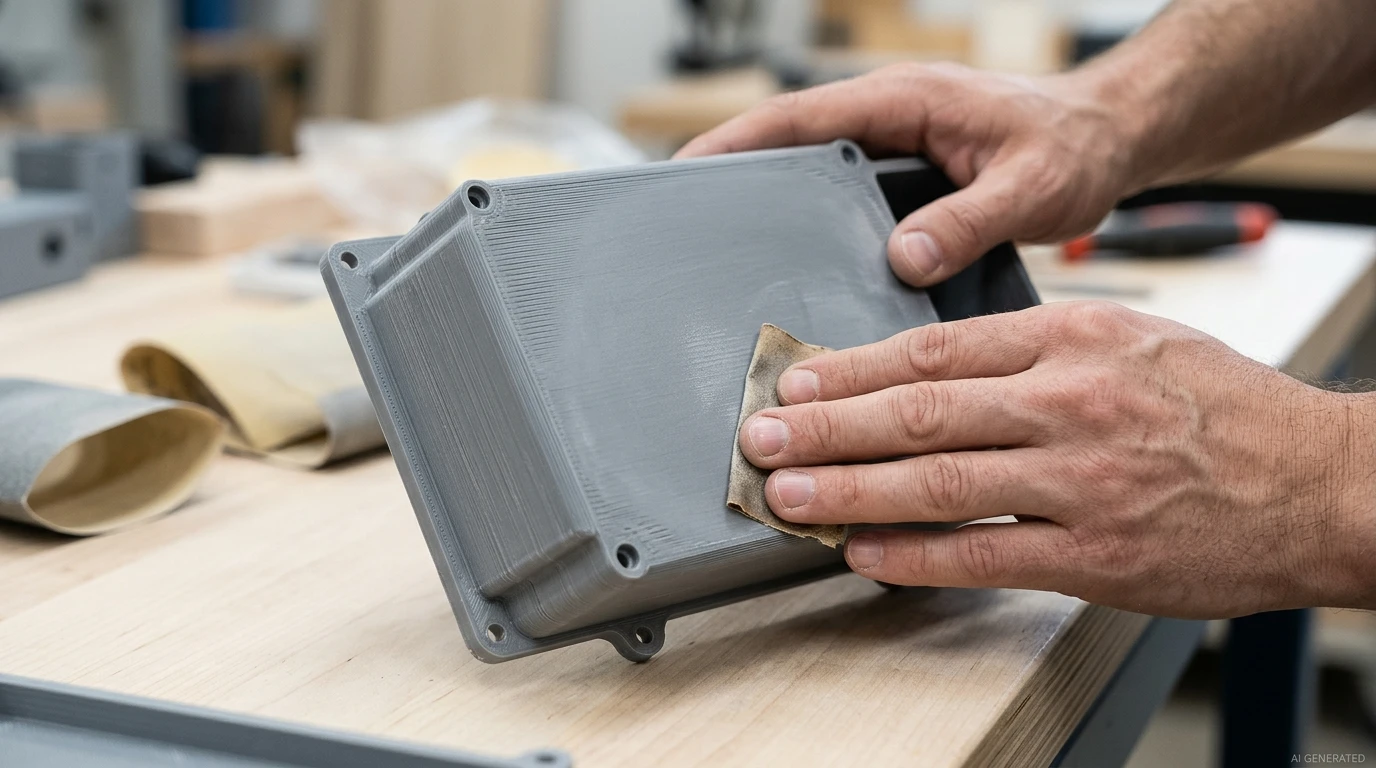
How to sand 3D prints depends on the material, surface condition, and finish you need. Sanding 3D Prints is a common post-processing technique used to improve surface quality. It is particularly useful for FDM parts with visible layer lines and for removing localized surface defects on resin 3d-printed parts. For some materials and applications, other 3D print smoothing methods may be suitable, too.
Sanding is one of the simplest ways to improve a printed part's surface smoothness. The key is choosing the right abrasive and knowing when to stop. Start too coarse, and you can leave scratches that take a long time to remove. Sand too aggressively, and you may round sharp edges, damage fine details, or alter dimensions critical to assembly.
The best way to sand 3D prints depends on the material, the condition of the surface, and the finish you need. A decorative PLA model may need several sanding stages before painting. A resin component may only need local support marks removed, while a precision part may be better left untouched in critical areas.
This guide explains how to choose the right sandpaper grit, follow a step-by-step sanding process, decide between wet and dry sanding, and select suitable finishing mehhods for different 3D printing materials.
Why Sand 3D Prints?
Sanding removes small amounts of material to improve a 3D-printed part's surface. It can reduce visible layer lines and support marks, improve surface feel, and prepare parts for painting. However, its effectiveness depends on the material, the severity of the defects, and the areas being sanded.
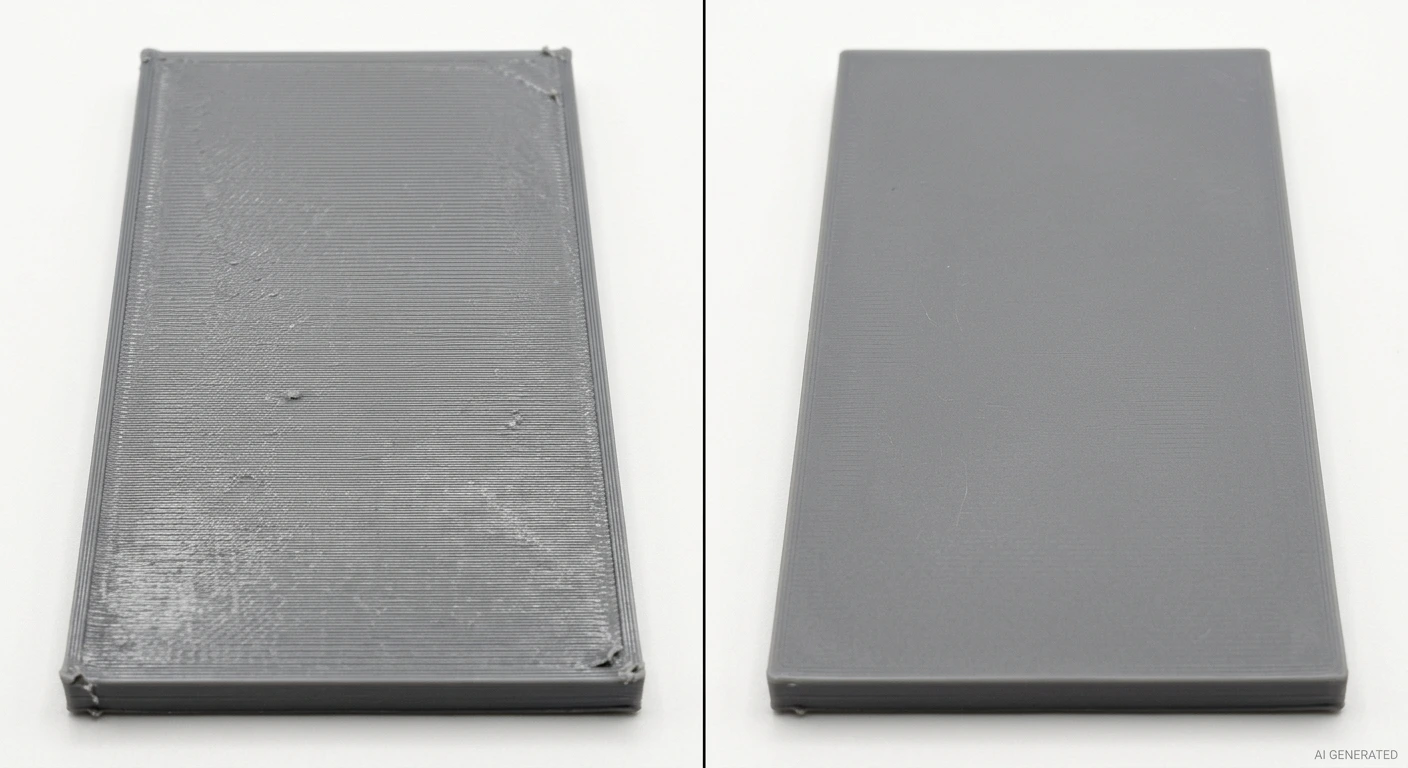
FDM printed surface before vs. after sanding
Common reasons to sand a 3D print are:
- Reduce layer lines: Minimize visible ridges on FDM prints.
- Remove support marks: Smooth bumps and rough spots left by support removal.
- Improve surface feel and appearance: Reduce minor imperfections on edges, curves, and accessible surfaces.
- Prepare for painting: Create a more consistent surface for primer and paint.
For a broader comparison of finishing choices, see our guide to 3D printing post-processing.
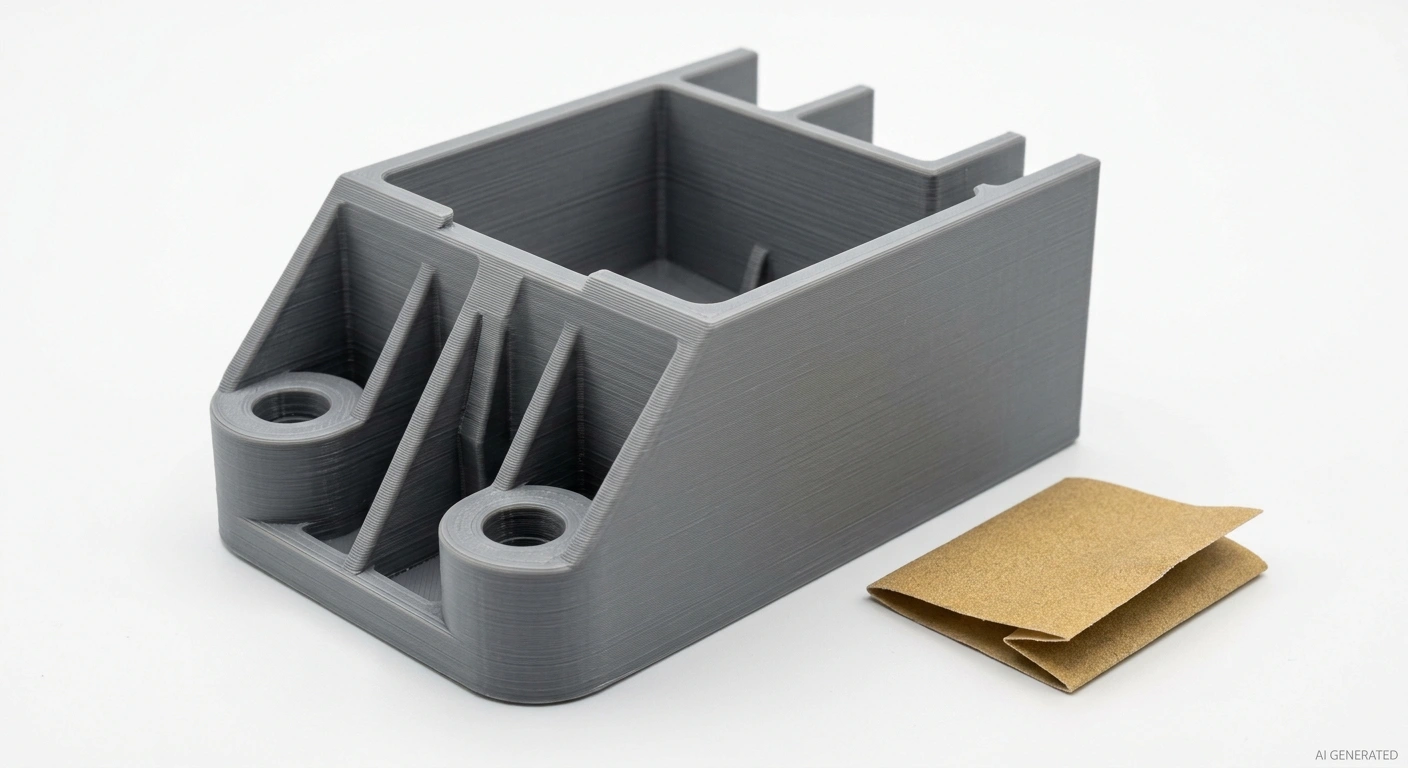
Functional 3D printed bracket
What to Know before Sanding 3D Prints
Before sanding, identify the printing material, check the model's wall thickness, and mark any areas where dimensions must be preserved. PLA, PETG, ABS/ASA, and flexible filaments behave differently during sanding. For fiber-filled or other filled materials, check the safety data sheet (SDS) for appropriate dust-handling precautions.Resin-printed parts should complete the material-specific washing and post-curing steps before further post-processing, following the manufacturer's instructions.
Use angled lighting to inspect the surface and identify whether you are dealing with raised imperfections, depressions, or ordinary layer lines. Sanding removes material, so deep depressions may be better addressed with filling, model adjustments, or reprinting rather than sanding down the surrounding surface and changing the part's shape.
Before sanding, test-fit the part if it needs to assemble with other components. Mark snap-fit features, screw holes, bores, and mating surfaces that must retain their dimensions, and avoid excessive material removal in these areas.
When Should You Avoid or Limit Sanding?
Sanding removes material, so even a small amount can matter when a part has tight tolerances or functional features.
Avoid or limit sanding on:
- Precision holes, shafts, threads, and mating surfaces that control assembly fit.
- Thin walls and narrow ribs that could become weak or uneven.
- Fine lettering, embossed details, small clips, and sharp corners.
- Sealing surfaces or features that must maintain a specified dimension.
- Parts where the surface finish is already acceptable for the intended use.
If a printed bracket has a rough outer face but a hole that must fit a bearing, sand the outer face without touching the bore. For functional parts, decide which surfaces can be altered before you start.
Tools and Workspace Preparation
Prepare sandpaper in several grits, sanding blocks, small files, a soft brush, and measuring tools. Use sanding blocks for flat surfaces and flexible abrasives for curved areas. Take care around edges and fine details.
- Control dust: Ensure adequate ventilation and dust collection. Follow the material's SDS for respiratory protection.
- Protect your eyes: Wear safety glasses and secure the part before sanding or removing supports.
- Use tools safely: Follow the manufacturer's instructions and keep loose clothing and hair away from rotating parts.
- Avoid overheating: Sand in short intervals with light pressure. Stop if the part becomes hot, tacky, or deformed.
Wet Sanding vs Dry Sanding Which Should You Use
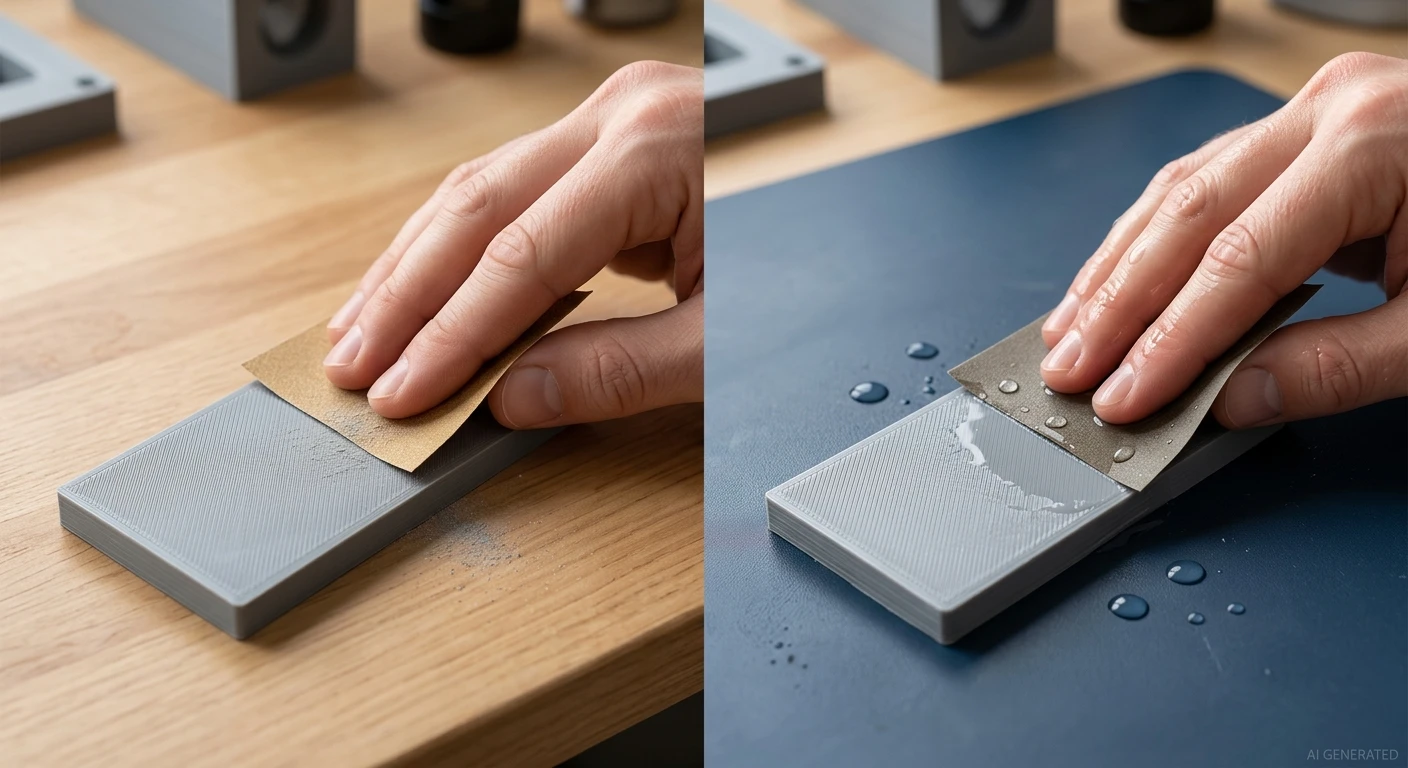
Comparison of dry sanding and wet sanding techniques
Dry sanding is convenient for initial material removal and for areas where water would be difficult to control. Wet sanding uses water with suitable wet-rated abrasive paper to help carry away sanding residue and reduce airborne dust. It can also reduce friction and heat in some situations.
Neither method is best for every material or stage. Choose based on the abrasive, the printed material, and the finish you need.
| Factor | Dry sanding | Wet sanding |
|---|---|---|
| Best use | Initial material removal and accessible surfaces | Fine finishing on compatible materials |
| Main advantage | Convenient and easy to use without water | Helps control dust and can reduce heat buildup |
| Main limitation | Creates more airborne dust | Not suitable for every material, abrasive, or part |
| Practical tip | Use dust extraction or other suitable dust controls | Use wet-rated paper and manage water safely |
1When to Dry Sand
Dry sanding 3d prints is useful when removing support marks, trimming down raised defects, or smoothing a rough surface before finer finishing. It is easy to set up and allows you to see the surface as you work, though dust can make inspection difficult.
Use appropriate dust protection and ventilation, especially when sanding plastics, resin, or composite-filled materials. Avoid brushing dust into the air or using compressed air to blow it away.
2When to Wet Sand
Wet sanding can be useful for fine finishing when the material and part can tolerate moisture. Use wet-rated abrasive paper, and avoid wet sanding parts with moisture-sensitive materials, exposed inserts, or cavities that cannot dry thoroughly. For resin prints, complete washing and post-curing before sanding; water does not make uncured resin safe to handle. Collect sanding residue appropriately rather than washing it into a sink.
What Sandpaper Grit Should You Use for 3D Prints?
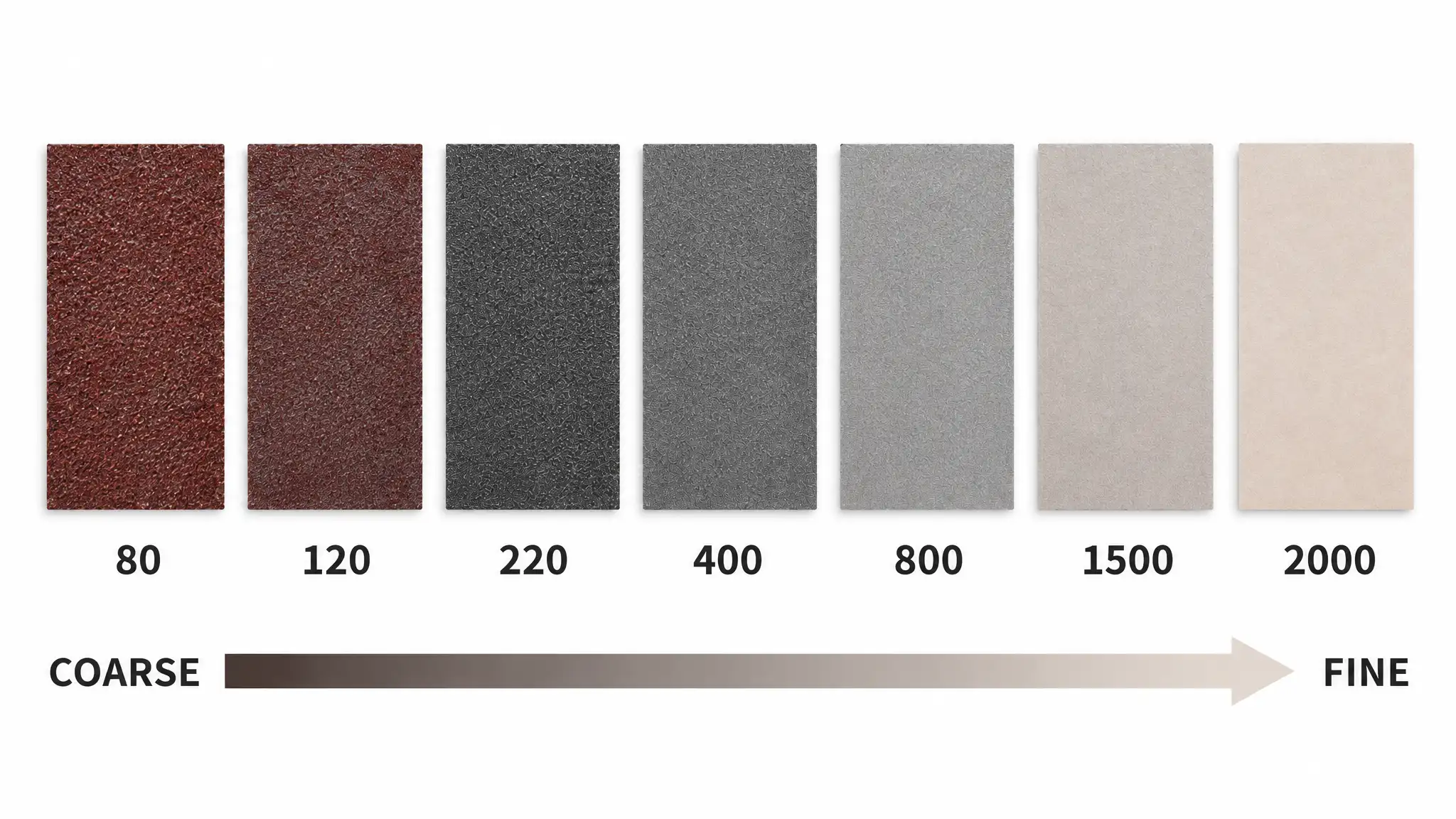
Sandpaper grit describes the size of the abrasive particles. Lower grit numbers generally indicate coarser abrasives that remove material faster and leave deeper scratches. Higher grit numbers indicate finer abrasives that remove less material and leave a smoother surface.
The best sandpaper for 3D printing depends on the material and the condition of the part. A rough print with prominent support scars needs a different starting point from a clean print with faint layer lines.
Choosing a Starting Grit
Use the following ranges as a starting guide, not a fixed sequence. Choose based on the amount of material to remove and the intended finish.
| Surface condition | Possible starting grit | Main purpose |
|---|---|---|
| Heavy support marks or raised defects | 120–240, where suitable | Remove protrusions and level rough areas |
| Visible layer lines or moderate roughness | 240–400 | Reduce ridges and surface irregularities |
| Light scratches after initial sanding | 400–600 | Refine the surface |
| Fine finishing before some paints or coatings | 600–1000 or as specified by the coating system | Prepare a more consistent surface |
Avoid starting with coarse sandpaper if the surface is already relatively even. For thin parts or fine details, a finer starting grit can help reduce the risk of removing too much material. Always check that the abrasive is suitable for the printed material.
When Should You Move to a Finer Grit?
Move to a finer grit when the current abrasive has sufficiently reduced the targeted defects. Rather than following a fixed time interval, inspect the surface before progressing.
- The main defects are reduced: Raised marks and layer ridges are no longer prominent.
- The scratch pattern is consistent: Scratches from the previous grit have been replaced by finer, more uniform marks.
- The surface looks even: Inspect under direct or angled lighting for remaining rough patches and deep scratches.
For example, after sanding a PLA enclosure with 240-grit paper, inspect it before moving to 400 grit. If deep scratches remain, continue with the coarser grit only where needed, using light pressure. Then move to finer abrasives to refine the surface.
Avoid prolonged sanding with coarse grits, which can create flat spots, round corners, or alter critical dimensions. Finer grits refine the surface but remove deep scratches less efficiently.
How to Sand 3D Prints Step by Step
A controlled sanding process gives you a more predictable finish than using one abrasive on the whole part. Before starting, decide which surfaces need improvement and which features must keep their shape.
1Prepare the Print and Remove Support Marks
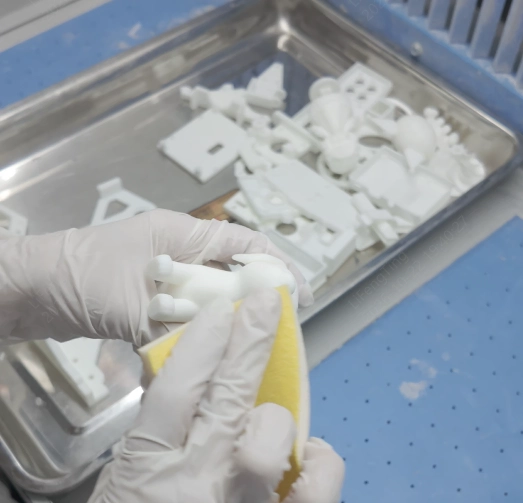
Remove supports, brims, and other excess material before sanding. Use flush cutters for accessible support connections and a hobby knife only where you can control the blade safely. Avoid pulling supports away forcefully, since that can tear the surface or break thin features.
Clean the part to remove loose debris and check where the remaining defects are. Marking problem areas lightly with a pencil can help you track your progress on a light-colored print, but test first to make sure the mark will come off.
If the print has deep support scars, remove raised material carefully before working on the surrounding surface. Sanding the entire part to the depth of the deepest scar may damage the geometry.
For SLA resin prints, make sure the part has been properly washed and fully post-cured according to the resin manufacturer's instructions before sanding. Use appropriate dust control and protective equipment for the material.
2Start with Coarse Sanding
Choose an abrasive that can remove the defects without taking away unnecessary material. Use short, controlled strokes and light pressure. On flat surfaces, a sanding block can help distribute pressure evenly. For curved surfaces, flexible sandpaper or a sanding sponge is often easier to control.
Work on raised marks and obvious high spots first. Check your progress regularly rather than sanding continuously in one area. On a rounded model, keep the abrasive moving so you do not create a flat patch. Around a mounting hole or thin wall, use extra care because the geometry can change quickly.
If the surface is already fairly smooth, skip the coarse stage. You do not need to use every grit in the range.
3Progress Through Finer Sandpaper
Once the major defects are reduced, move to a finer grit to remove the scratches left by the previous abrasive. A sequence such as 240, 400, and 600 grit may work for some prints, but a different sequence may be more appropriate for a rough part, a delicate model, or a surface that will be painted.
Avoid jumping straight from a very coarse grit to a very fine one. Fine paper removes material more slowly, so it can take a long time to eliminate deep scratches.
You also do not need to sand every part of the model to the same finish. If only the front face will be visible, spend more time there and leave hidden surfaces alone, provided they do not affect assembly or function.
4Clean and Inspect the Surface
Remove sanding dust before judging the finish. Use a suitable brush or cloth, and avoid blowing dust into the air. For wet sanding, remove residue and let the part dry fully before inspection or coating.
Check the surface under direct light from several angles. Layer lines and scratches that disappear under diffuse lighting may still show under a bright lamp. Inspect edges, small features, corners, and support-contact areas separately.
If you plan to paint the part, look for scratches that may show through the primer. If the part must fit another component, check its critical dimensions rather than relying on appearance alone.
Stop when the surface meets the intended requirement. Chasing a perfectly smooth finish can waste time and compromise the shape of the part.
Material-specific Sanding Tips
Different 3D printing materials require different sanding approaches. Consider the material's response to frictional heat, surface details, and finishing requirements before choosing how to proceed.
Sanding PLA 3D Prints
PLA is commonly sanded to reduce visible layer lines, remove support marks, and prepare parts for painting. For light layer lines, start with 240- or 400-grit sandpaper and assess the surface before moving to finer grits. Use coarser abrasives only where raised defects require them.
The main challenge when sanding PLA is frictional heat. PLA can soften, smear, or deform if too much heat builds up. Understanding PLA's temperature resistance can help you better understand its heat sensitivity during sanding. Use light pressure and short passes, allowing the part to cool if it starts to feel warm. Take extra care around thin walls, sharp edges, and fine details.
The best way to sand PLA is not necessarily to make the raw plastic perfectly smooth. If the part will be painted, focus on preparing a consistent surface for the primer and coating system. A compatible primer or filler may help conceal shallow layer lines more efficiently than continued sanding. For alternatives to sanding, explore these PLA smoothing methods to learn how to achieve a smoother surface finish.
Sanding SLA Resin Prints
SLA resin prints often need only localized sanding to remove support marks or other surface imperfections. Sanding the entire part may be unnecessary if most of the surface is already smooth.
Before Resin 3D print sanding, fully wash and post-cure the print according to the resin manufacturer's instructions. Wear suitable protective equipment and control sanding dust. Do not assume that water makes uncured resin safe to handle.
Carefully remove raised support remnants and blend the affected areas with progressively finer abrasives. For parts that will remain unpainted, inspect the finish under appropriate lighting, as sanding scratches can be especially noticeable on glossy or dark surfaces.
For full-color resin prints, keep sanding to a minimum where possible. Abrasion can remove surface color and fine details, leaving visible patches. If appearance is critical, confirm suitable finishing options with the service provider before modifying the part.
| Resin part or finish | Possible sanding approach |
|---|---|
| Black resin | Local sanding around visible defects and support marks to limit changes in sheen |
| White resin | More extensive surface preparation may be appropriate before painting |
| 8001 resin | Fine finishing may be used where the specified appearance requires it, after confirming the material's finishing guidance |
| Full-color resin | Restrict sanding to necessary areas to avoid removing color or damaging surface detail |
The exact method depends on the resin formulation, the printing process, and the required appearance. Do not assume a color determines the grit sequence or that a workflow suitable for one resin transfers directly to another.
For full-color parts, sanding can remove surface color or leave visibly different patches. If appearance is critical, confirm the finishing method with the service provider before modifying the part.
Sanding Metal 3D Printed Parts
Metal additive-manufactured parts need even more care. Sanding can affect dimensions, edge conditions, and functional surfaces. A metal bracket may need a specific surface finish around a mating face while other areas can remain as printed. In such cases, controlled machining or a specified abrasive process may be more appropriate than hand sanding.
For metal parts, consider these questions before finishing:
- Does the surface affect assembly, sealing, friction, or wear?
- Is there a dimensional tolerance that the finishing process must preserve?
- Does the entire part need the same texture, or only selected areas?
- Can the finishing process be repeated consistently across multiple parts?
For production components, agree on the required surface finish and critical dimensions before choosing a finishing method.
Choose a suitable 3D printing process and material for your application. Explore JLC3DP's 3D printing capabilities for prototypes and functional parts.

- Starting From $0.3 per part · No Minimum Order Quantity
- 24-Hour Lead Time · Up to $123 Welcome Coupons
Is Sanding the Best Way to Finish 3D Prints?
Sanding works well for local defects and surface preparation, but it is not always the most suitable finishing method. The right choice depends on the material, part geometry, surface requirements, and dimensional tolerances.
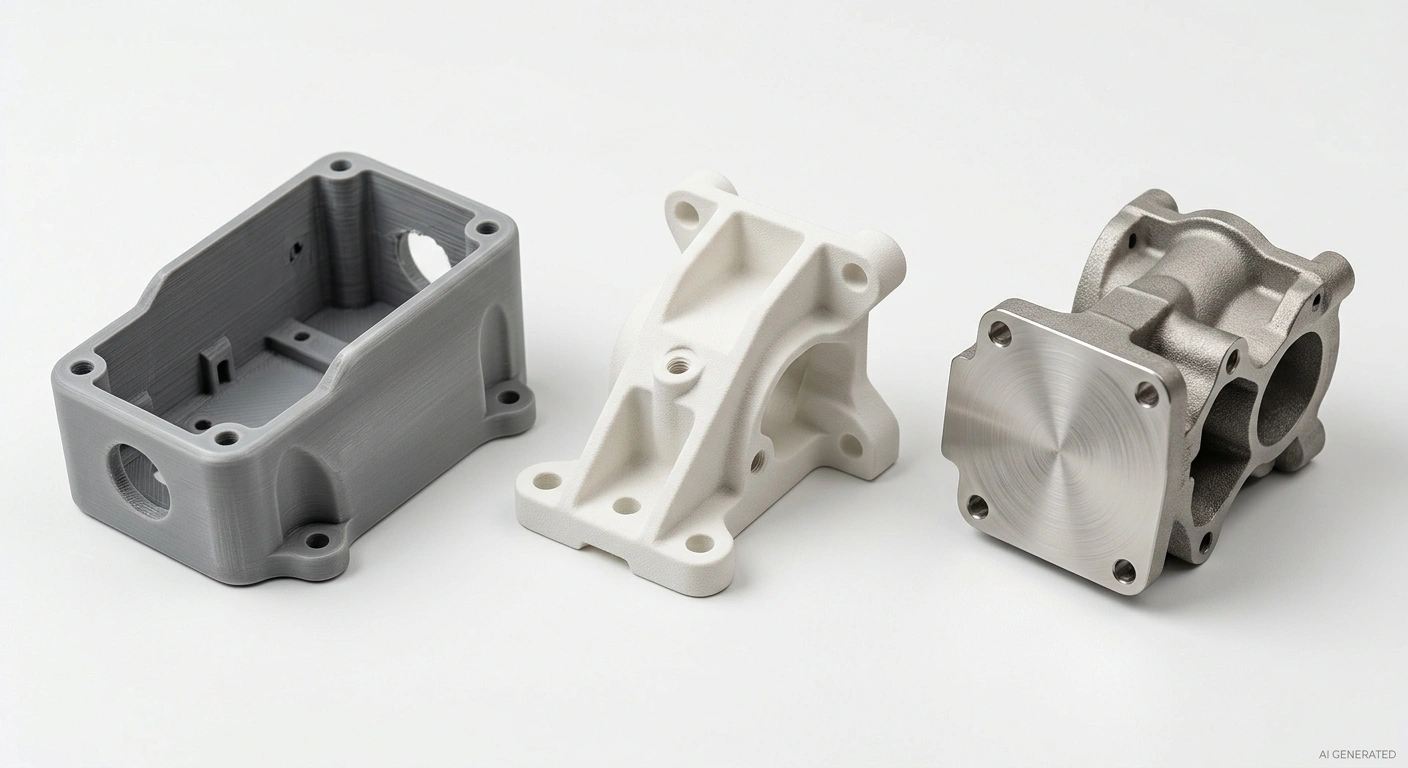
Hand sanding, abrasive blasting, and machining finishes
| Method | Best for | Main consideration |
|---|---|---|
| Sanding | Local defects, layer lines, and preparation for paint | Removes material and requires manual control |
| Sandblasting | Creating a more uniform texture on compatible parts | Media and process settings affect the surface |
| Coating | Improving appearance or adding a specified surface layer | Requires material compatibility and surface preparation |
| Machining | Precision features and controlled dimensions | Needs suitable access, workholding, and machining allowances |
When Sandblasting is Better
Abrasive blasting can treat a wider area more consistently than hand sanding, especially on compatible nylon or other suitable parts. The result depends on the abrasive media, pressure, distance, and material. Blasting can also change surface texture or damage fine features if the process is too aggressive.
Sandblasting PLA is possible in some setups, but PLA's response depends on the part geometry and blasting conditions. Do not assume blasting will automatically create a smoother surface or preserve fine details.
When Coating or Machining Makes More Sense
Coatings are useful when the goal is to change appearance, add a specified surface layer, or achieve a particular finish. They do not automatically correct dimensional errors, and surface preparation still matters.
Machining is more suitable when a printed part needs a precise hole, flat mating face, or controlled dimension. It can remove material accurately from accessible features, but the part must be designed and fitted for the operation.
Choose the method based on the actual requirement. A decorative model may benefit from sanding and primer, while a functional component may need only selective machining or no surface finishing at all.
What to Do after Sanding 3D Prints
Sanding alone may not remove every visible layer line or small surface defect. For painted parts, a primer or filler can help create a more uniform surface before the final coat.
A typical workflow is:
- Clean the surface. Remove sanding dust and let the part dry if you used water.
- Apply a compatible primer or filler. Follow the product instructions for material compatibility, coat thickness, and drying time.
- Sand the primer if required. Use the grit recommended for the primer and the intended topcoat. Avoid cutting through the primer on corners and edges.
- Inspect and apply the finish coat. Make sure the surface is clean and dry before painting.
Primer helps in two ways: it can fill shallow imperfections, and it creates a more consistent base for paint. A filler primer may hide fine surface irregularities, but it will not reliably fix deep gaps, major print defects, or incorrect geometry.
Do not use a thick coating to compensate for every defect. Heavy coats can obscure small details, soften sharp edges, and create an uneven finish. Test the full process on a spare print or hidden area when appearance matters.
The right preparation also depends on the plastic and coating system. Confirm that the primer and paint are compatible with the printed material, and follow the manufacturer's safety and curing instructions.
Common Sanding Mistakes and How to Avoid Them
A smooth finish comes from controlling material removal, not simply sanding for longer. These are common problems to watch for.
1Starting with the Wrong Grit
Coarse sandpaper can remove defects quickly, but it can also leave deep scratches or damage thin features. Starting too fine can make the process unnecessarily slow.
Choose the least aggressive grit that can remove the defects you need to address. Test it on a less visible area if you are unsure.
2Skipping Too Many Grit Levels
Moving from coarse paper directly to very fine paper may leave scratches that are difficult to remove. The finer abrasive can smooth the surface around a deep scratch without eliminating it efficiently.
Progress through suitable grit levels and check the scratch pattern before moving on. You may be able to skip a grade when the previous scratches are already shallow, but inspect rather than assume.
3Over-Sanding Details
Repeated sanding can round corners, flatten curved surfaces, erase embossed lettering, and weaken thin features. It can also make support marks more noticeable if you remove too much material around them.
Use small sanding sticks or narrow pieces of abrasive for confined areas. Protect critical surfaces and stop when the defect is sufficiently reduced.
4Expecting Sanding Alone to Create a Perfect Finish
Deep layer lines, gaps, and major surface defects may take too much material to remove safely by sanding alone. On painted parts, a suitable filler or primer may be more effective for shallow imperfections.
Inspect the part before choosing the next step. If a defect is too deep, consider whether it can be filled, repaired, or avoided by changing the print orientation or support strategy on the next iteration.
5Ignoring Dimensional Changes
Sanding changes the shape of the part, even when the difference is hard to see. This matters around bearing seats, threads, snap fits, sealing surfaces, and other features that control assembly.
Identify critical areas before sanding and measure them when necessary. If the part needs a precise fit, do not rely on visual inspection alone.
If the roughness is mainly on the top face, here's a guide to smoothing the top layer of a 3D print for fixes that go beyond sanding alone.
FAQs about Sanding 3D Prints
Q: What grit sandpaper should I use for a 3D print?
For light layer lines, 240–400 grit is a reasonable starting range. Heavier support marks may need coarser paper, while fine finishing may use 600–1000 grit. Adjust the sequence to the material, surface condition, and intended finish.
Q: What is the best way to sand PLA 3D prints?
Use light pressure and a suitable grit for the defects. Start with medium-grit paper for moderate layer lines, then move to finer grits to reduce scratches. Avoid excessive friction because heat can soften or smear PLA.
Q: Should I wet sand or dry sand a 3D print?
Dry sanding is convenient for initial material removal. Wet sanding can help control dust and heat during fine finishing, but only use it when the material, part, and abrasive are suitable for moisture.
Q: Can sanding completely remove layer lines?
Sanding can reduce or remove shallow layer lines, but deep lines may require substantial material removal. Primer or filler can help with remaining shallow imperfections before painting. Fine details and dimensional requirements may limit how much sanding is practical.
Q: Can you sand resin 3D prints?
Yes. Fully washed and post-cured SLA resin prints can be sanded to reduce support marks, smooth surfaces, or prepare for painting. Use appropriate dust control and protective equipment, and take extra care with full-color or detailed parts.
Q: Can sanding affect the dimensions of a 3D printed part?
Yes. Sanding removes material and can change dimensions, round edges, enlarge openings, or alter mating surfaces. Avoid sanding critical features unless the process accounts for the required tolerances.
Getting the Best Finish from Sanding 3D Prints
Sanding is useful when a 3D printed part needs smoother surfaces, fewer support marks, or better preparation for paint. The best results come from choosing an appropriate starting grit, removing only the material you need to, and checking the surface between stages.
The material matters just as much as the grit. PLA needs careful heat control, resin prints must be fully cured before sanding, and metal components may need a more controlled finishing method when dimensions and repeatability matter.
For some parts, sanding is enough. Others benefit from primer, blasting, coating, or machining. Choose the process that meets the part's actual surface and functional requirements rather than trying to make every print perfectly smooth by hand.
Keep Learning
Sand 3D Prints: Grits, Techniques & Materials
Key Takeaways Choose the right sanding 3D Prints approach: Consider the material, surface defects, part geometry, and required finish before starting. Select the right sandpaper grit: Start with a suitable grit and progress to finer grits to reduce scratches. Wet sanding vs. dry sanding: Choose the approach based on the material and sanding requirements. PLA requires careful heat control, while resin prints need material-specific post-processing and dust precautions. Metal parts may require alternativ......
How to Smooth 3D Prints: The Main Methods from Sanding to Polishing
In the field of 3D printing, the surface quality of the finished product directly affects its appearance and functionality. Although 3D printing technology has made great progress, due to the principle of stacked printing, obvious layer lines often appear on the finished product, which not only affects the visual effect, but may also affect its performance in some applications. Therefore, it is particularly important to smooth the 3D printed parts. Smoothing can not only enhance the appearance of the ......
How to Smooth the Top Layer of a 3D Print
The top layer of a 3D print is the most visible part of the model, and problems such as uneven surfaces, gaps, or brushing can affect the appearance and usability of the print. The right settings, techniques, and post-processing can minimize these defects. If your 3D print top layer is not smooth, the cause may be incorrect print settings, insufficient top-layer thickness, or inadequate support beneath the surface. This guide covers common top-layer problems and practical ways to improve surface quali......
A Comprehensive Introduction to 3D Printing Post-Processing Techniques
Importance of 3D Post-processing Post-processing is critical in 3D printing because it provides numerous advantages that improve the overall quality and usability of printed objects. For instance, the visual appeal of 3D-printed objects is greatly enhanced by post-processing techniques. Through the use of finishes, layer line removal, and surface smoothing, post-processing can turn an uneven and textured print into a polished and smooth result. This is especially crucial for items meant for presentati......
3D Printing Spray Painting Process Revealed: Creating a Perfect Surface!
3D printing spray painting, in simple terms, is to spray color on the surface of 3D printed models to achieve the purpose of beautifying, protecting and improving the texture of the model. This process can not only enrich the visual effect of the model, but also enhance its durability and practicality. Overview of painting steps: • Model preparation: First, make sure the surface of the 3D printed model is flat, without obvious defects and support structure residue. • Surface treatment: Use sandpaper o......
Why Your 3D Prints Need Threaded Inserts: MJF & SLA Guide
Designing reliable threads in plastic parts is one of those details that seems simple until a prototype actually gets assembled. A screw may go in fine the first time — maybe even the second. After that, the threads start to loosen, plastic begins to deform, and the joint slowly loses its grip. This is where engineers typically weigh two options: printing threads directly into the part, or installing threaded inserts for 3d printed parts. Both approaches have their place. Printed threads can work well......